
Inside Enterprise AI Execution: The Complete Architecture of UI-Native AI Systems


A technical guide to how AI agents operate enterprise software directly through the interface, and the nine layers that separate a demo from a system a real enterprise can trust.
Why This Matters Now
Enterprise software has always had a hard problem sitting underneath it: getting new systems fully configured, tested, and adopted. Implementation consultants, systems integrators, and professional services teams have historically carried this work manually, reading requirements, making judgment calls, and clicking through unfamiliar software to configure it correctly. That labor is why implementation routinely costs as much as the software license itself, and why enterprise rollouts still average well over a year.
A new class of AI system, often called computer-use AI or UI-native AI, changes what is possible here. These agents perceive a screen, reason about a business goal, and act on the interface directly, the same channel a human user relies on. This guide breaks down how that class of system is actually engineered, from raw pixels up through the governance layer that determines whether an enterprise will trust it in production.
The Enterprise AI Stack
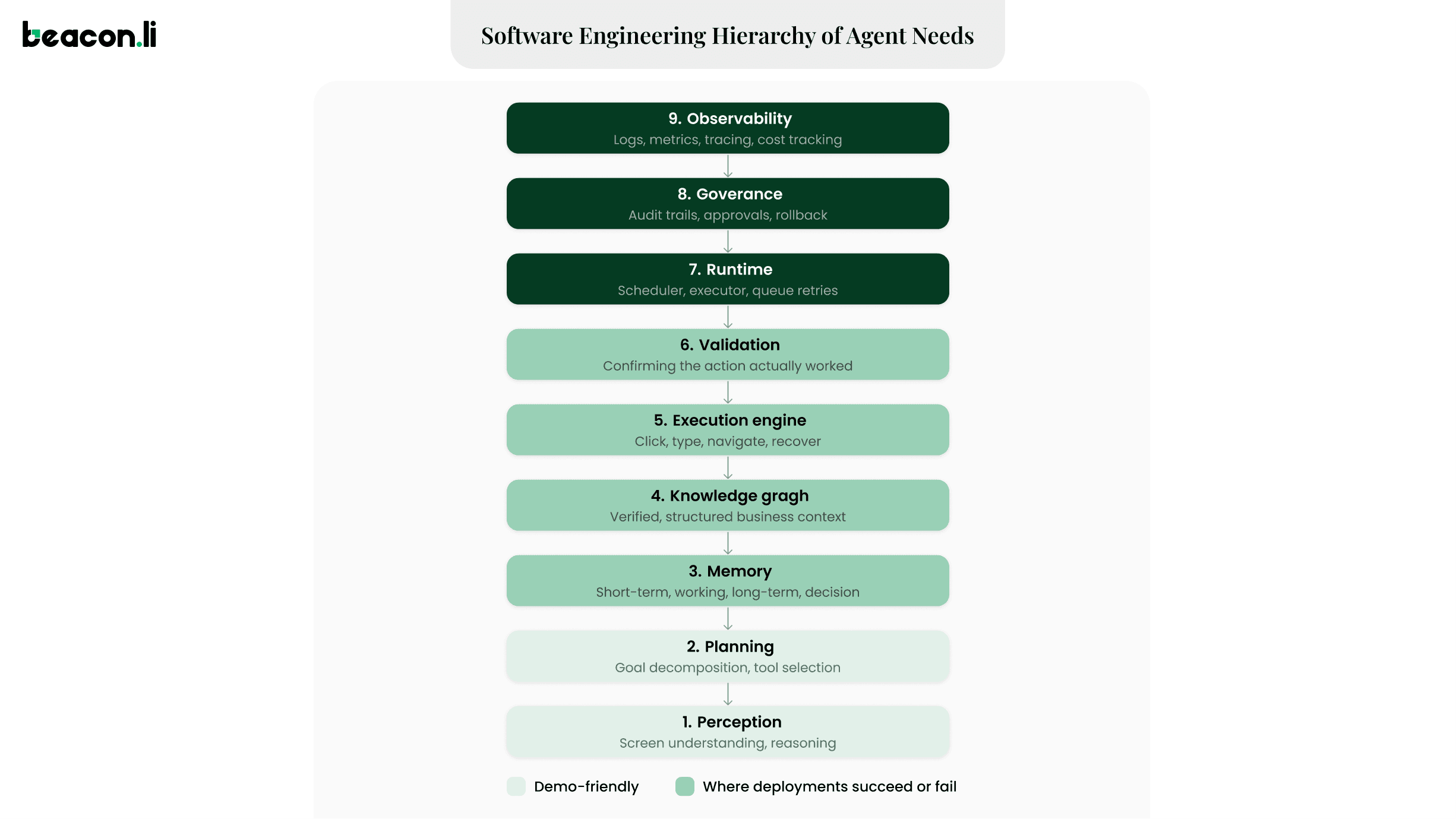
Most public discussion of computer-use AI focuses on a single loop: perceive, plan, act. That loop explains a demo. It does not explain a production system. A more complete picture separates the architecture into nine layers.
Layers one and two get most of the attention because they are the most demo-friendly. Layers three through nine are where enterprise deployments actually succeed or fail, and the rest of this guide works up through the stack.
Layer 1: Perception
Interface Understanding: From Pixels to Business Objects
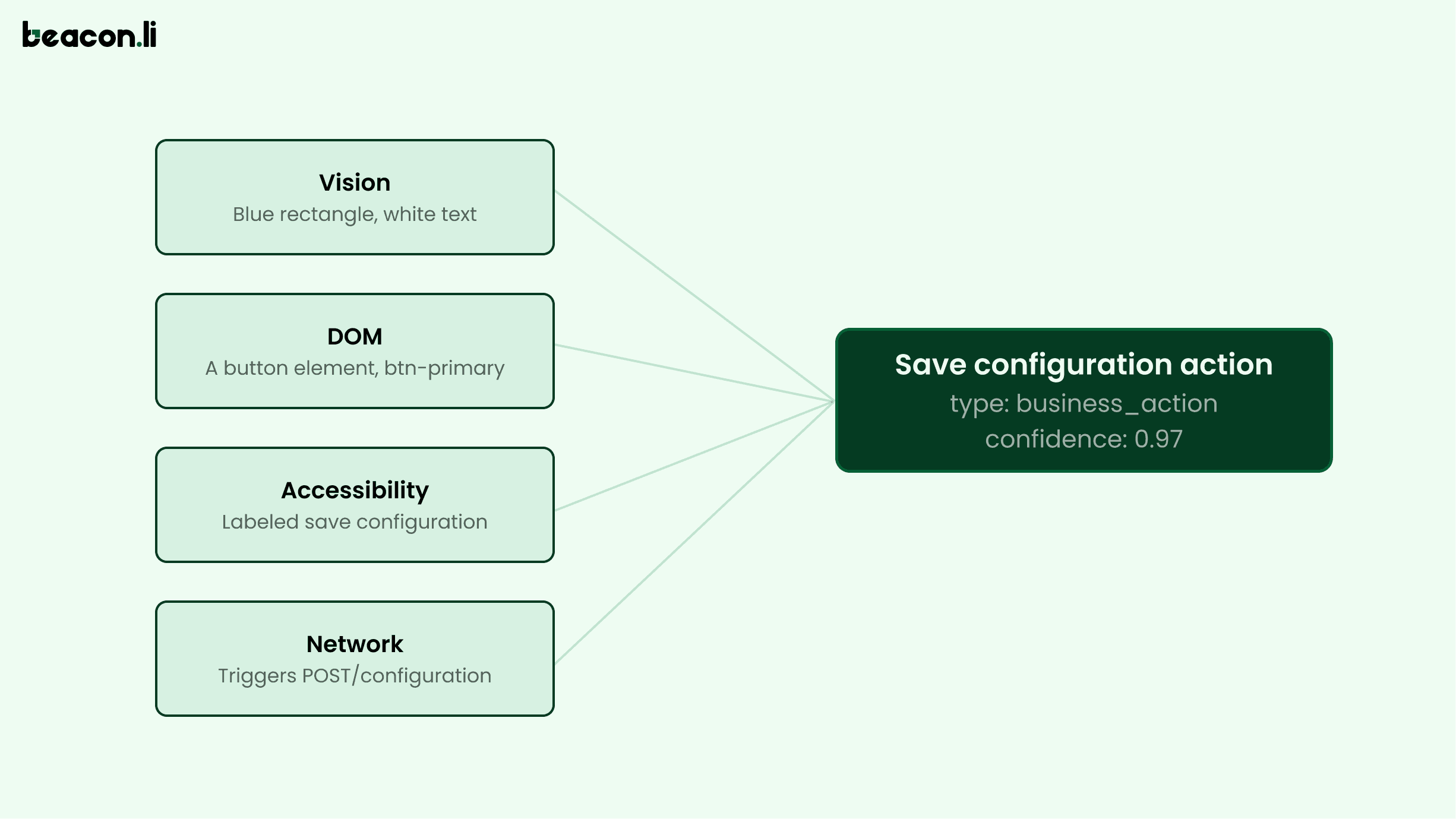
Every agent has to answer one question before doing anything else: what is actually on this screen, and what can be done with it. The best way to think about this treats vision, structural data, the DOM, and network signals as four independent inputs that get fused into a single business object.
Each signal alone leaves gaps. Vision cannot reliably distinguish a real button from a styled div that looks like one. The Document Object Model (DOM) cannot confirm an element is currently visible or interactable. A label cannot reveal what happens after the click. Fusing all four produces something an agent can act on safely and a human can audit clearly.
Three techniques feed this fusion. Vision-based understanding captures a screenshot and lets a multimodal model identify elements directly; Anthropic's Computer Use works this way, and purpose-built research models like Microsoft's OmniParser, Google's ScreenAI, and Apple's Ferret-UI have emerged specifically to make screen parsing more reliable than a generic image model alone can manage. Structural parsing reads the accessibility tree that browsers expose for screen readers, which strips a DOM of thousands of nodes down to what is actually interactive; Microsoft's Playwright MCP leans on this data for exactly this reason. OCR fills in the remainder: text embedded in images, canvas elements, and PDF viewers that resist both other techniques.
Enterprise software spans a huge range of technical maturity, from modern SaaS with clean accessibility markup to fifteen-year-old desktop systems with none. A system built for real enterprise environments has to combine all three techniques in one engine to cover that range.
The Network Layer
Clicking a button is a means, and the more important signal sits underneath it, in whatever that click actually triggers. A well-instrumented agent can observe that a click fired a REST call or GraphQL mutation, what payload it carried, and what status code came back. This is a stronger validation signal than a rendered success state, since a screen can display an optimistic confirmation before a server has processed anything, and a failed request can leave a UI looking unchanged while nothing was actually persisted.
This layer also has to reason about session state, since expired cookies or tokens are a common cause of an agent silently failing partway through a long task, and about idempotency, since retrying a failed POST that creates a leave request can produce duplicate records if the retry logic does not check whether the underlying action is safe to repeat.
Layer 2: Planning
Action Models: From Clicks to Business Goals
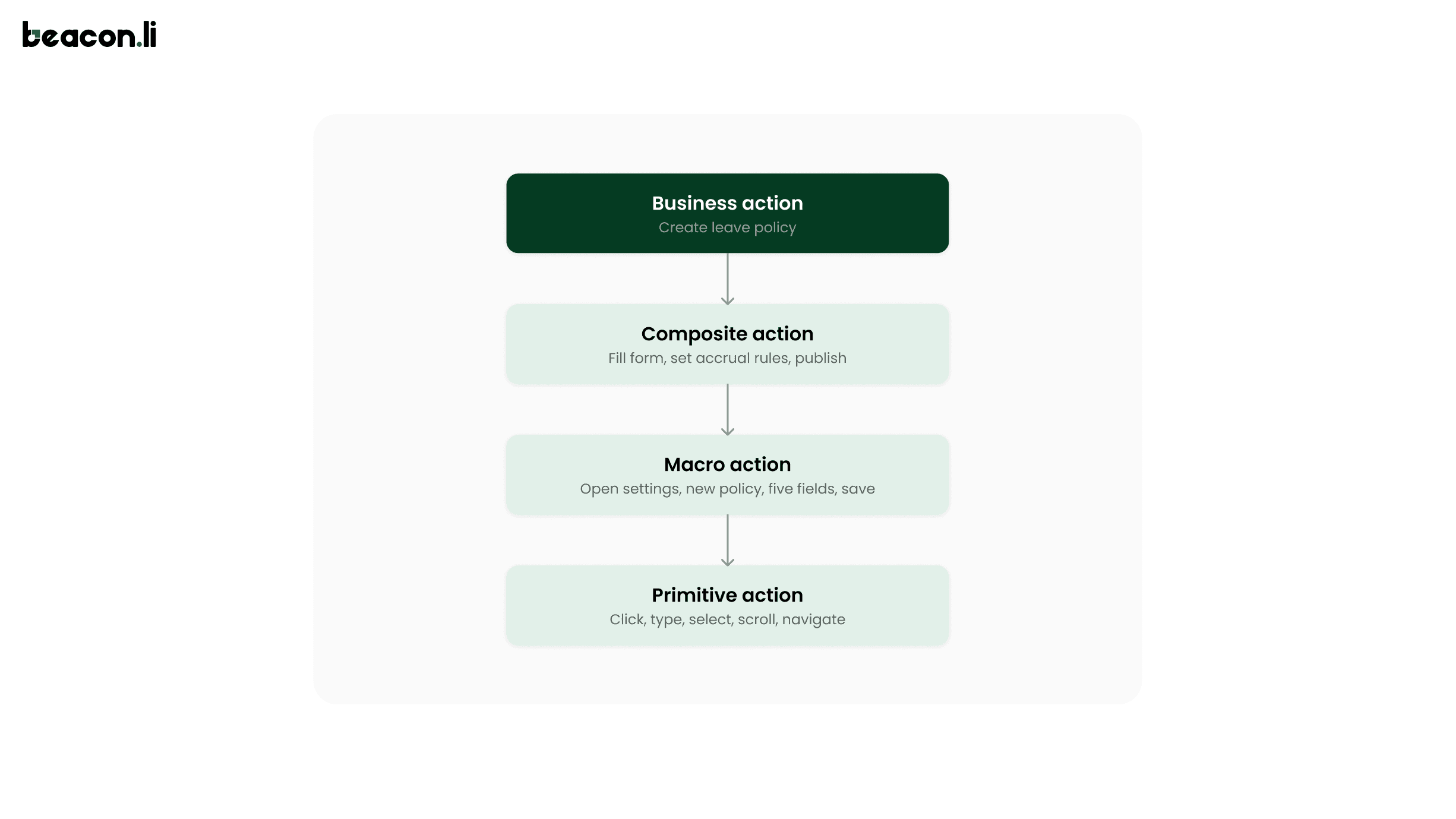
Every automated action can be described at several levels of abstraction, and enterprise-grade agents need to reason across all of them.
Traditional RPA operates almost entirely at the primitive level, which is precisely why a layout change breaks a bot: the script has no representation of "Create Leave Policy" independent of the exact clicks it took last time. An agent reasoning at the business-action level can lose the exact primitive sequence when the interface changes and still succeed, because it holds the goal one level up and can replan a fresh path of primitives to reach it.
Enterprise State Machines
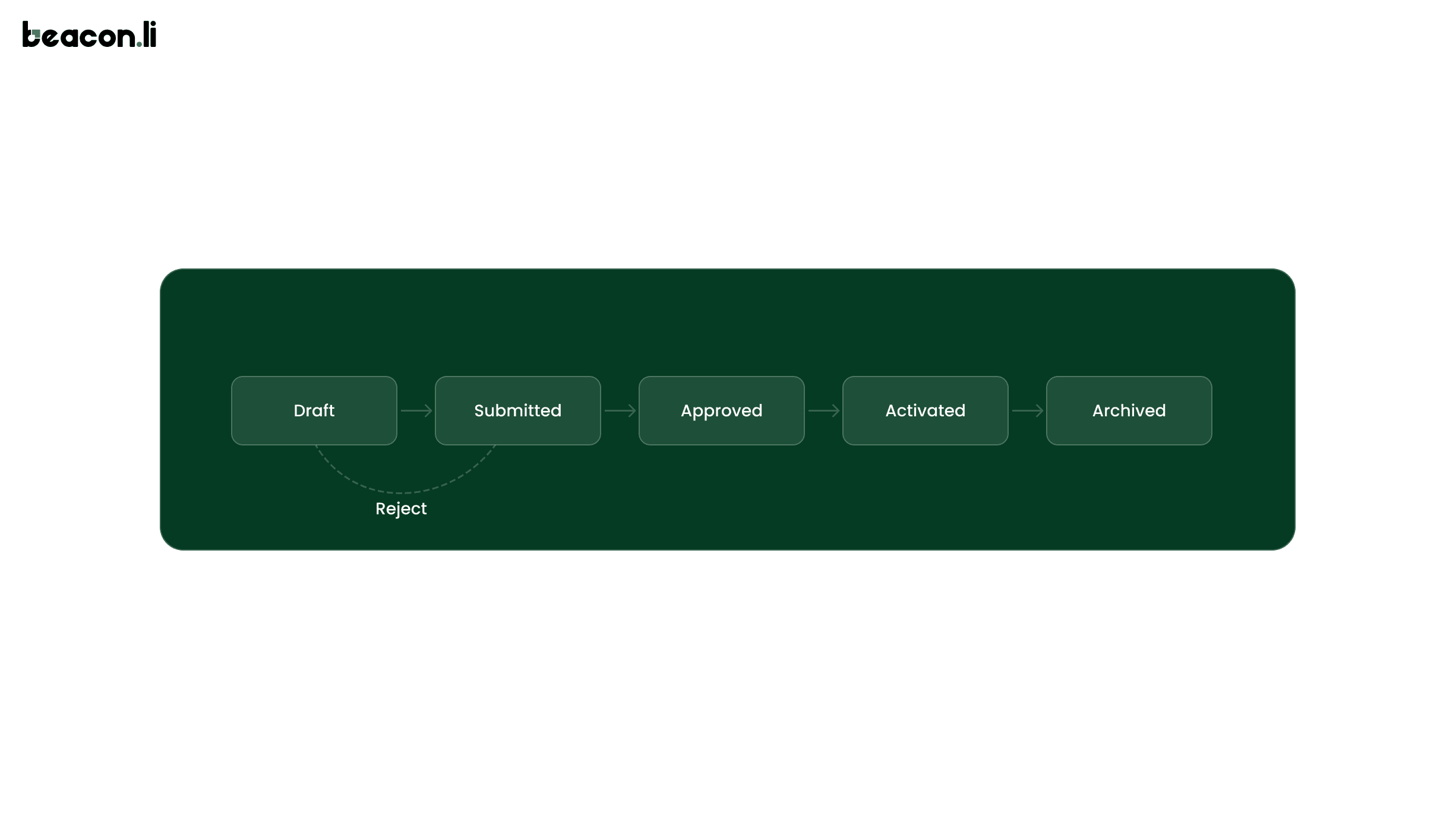
Enterprise software is, at its core, a set of state machines, and screens are simply the interface through which state transitions happen.
A leave policy, a purchase order, an insurance claim: nearly every entity moves through defined states with defined legal transitions, often gated by permissions or business rules. An agent reasoning only in terms of screens will plan a sequence like "navigate, click edit, change field, save." An agent reasoning in terms of state asks a more useful question first: what state is this entity in, and is the transition about to be attempted actually legal from there? Planning against the underlying state machine, alongside the screen itself, prevents an agent from attempting a transition the business logic will silently reject.
The Modern Toolkit and the Reasoning Loop
Planning decomposes a stated goal into an executable path, and the field has moved well past simply asking a model what to do next.
ReAct, introduced by Yao et al. at ICLR 2023, interleaves reasoning traces with actions and observations, so the model writes a thought, takes an action, observes the result, and folds that observation into its next thought, producing an interpretable trajectory rather than an opaque leap from goal to action. Reflexion, from Shinn et al., adds a self-critique step after a failed attempt, letting an agent improve within a task without any weight updates. Production systems also use hierarchical planning, decomposing a business goal into subgoals and only expanding a subgoal into primitive actions when it is about to execute, and tool calling, treating an interface action as one option among several, alongside structured calls like querying an API when a reliable one happens to exist.
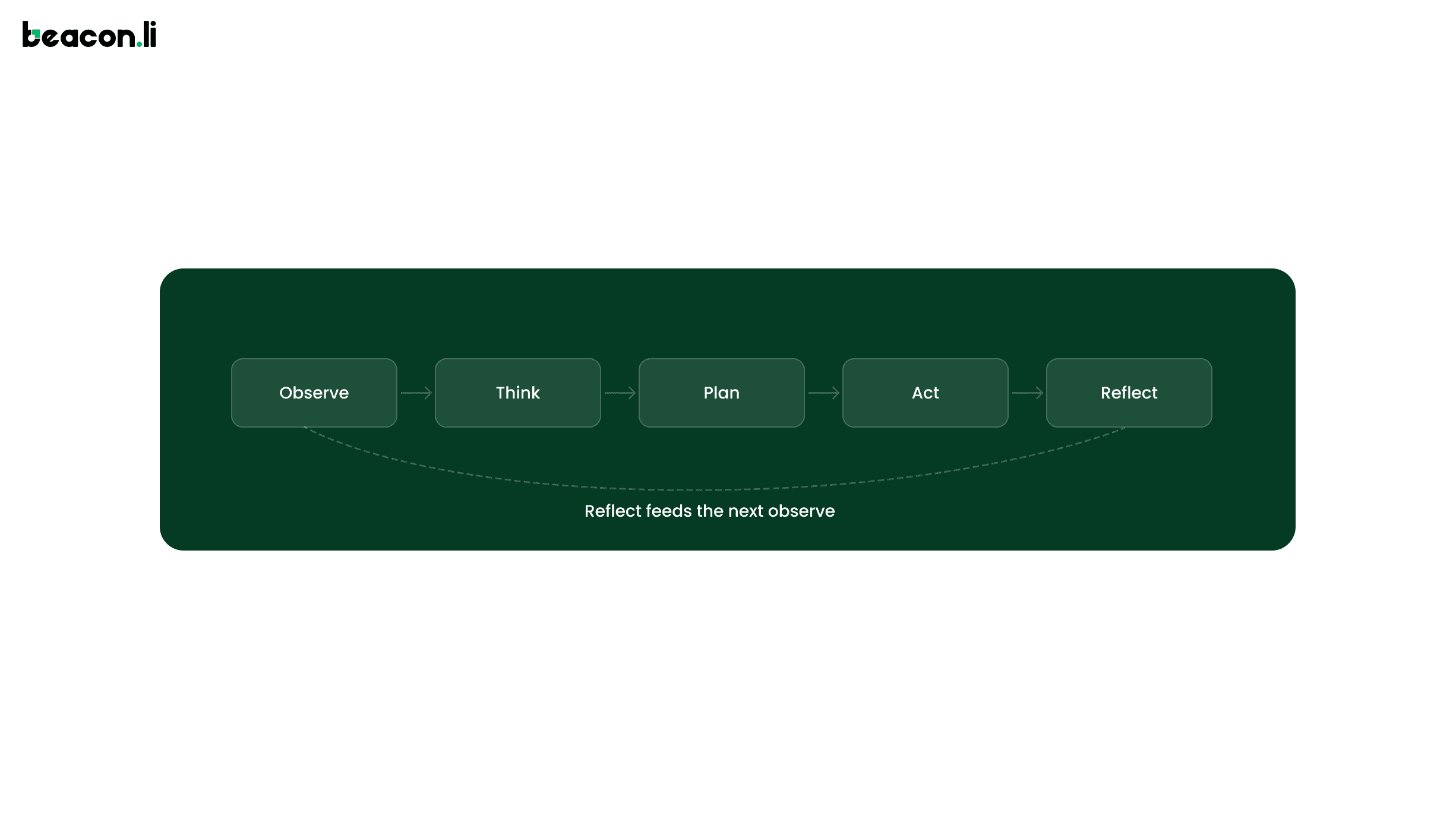
In production, this plays out as a continuous loop:
Observe combines interface understanding with the network signal. Think reasons over what was observed against the current goal. Plan produces the next action or short sequence. Act executes it. Reflect checks the outcome against expectation and feeds any surprise back into the next Observe. Running this as a continuous cycle, rather than committing to a single upfront plan, gives these systems resilience to the constant small surprises of real software: a slow-loading modal, a field that only appears conditionally, a validation error nobody anticipated.
Layer 3: Memory
A capable planning loop is only as good as what it remembers, and enterprise agents draw on several distinct memory tiers. Short-term memory holds the immediate context of the current step. Working memory tracks the state of the current task: which subgoals are done, what has already been tried and failed. Long-term memory holds durable knowledge about a specific client's environment, and in most systems this overlaps heavily with the knowledge graph below. Execution memory records what actions were actually taken and with what outcomes, forming the backbone of the audit trail. Enterprise memory sits above all of these, capturing patterns learned across every implementation a system has ever run, which is what makes the tenth implementation on a given platform meaningfully faster than the first.
Layer 4: Knowledge Graphs and the Decision Graph
Planning needs business context beyond the current screen, and unstructured document retrieval breaks down for the kind of relational reasoning implementation work actually requires. Knowing a client uses a particular approval workflow is one fact. Knowing which departments it applies to, which prior decisions constrain it, and which past implementations hit a similar edge case is a web of relationships that document search was never built to represent.
An enterprise knowledge graph stores entities such as clients, workflows, permissions, and requirements, connected through typed relationships like Depends On, Triggers, and Configures, giving the system verified structure to reason from instead of an inference pulled from scattered text. Structured knowledge layers like this have been shown to meaningfully reduce AI-generated error rates compared to standard document retrieval.
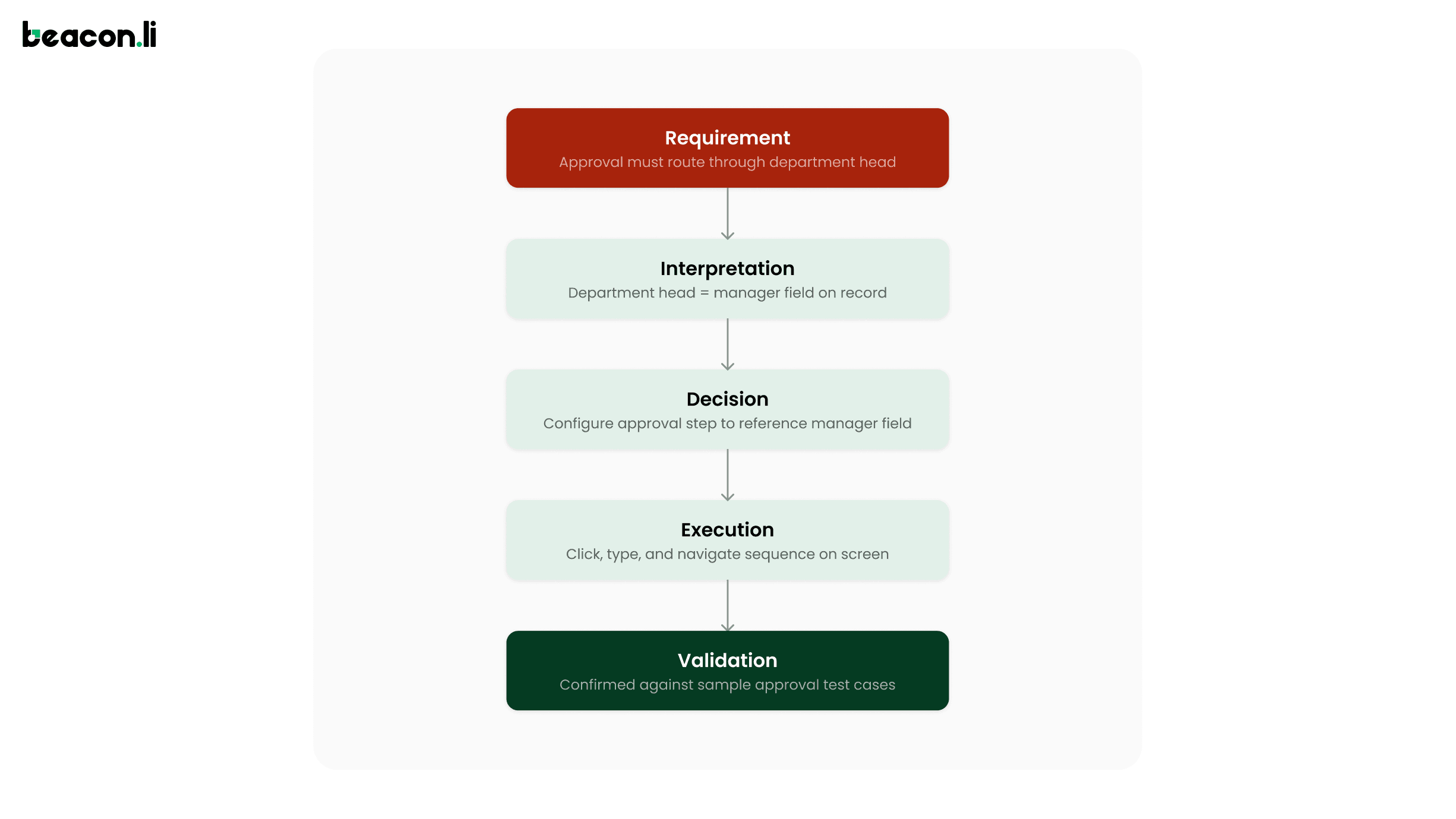
A knowledge graph stores what is true. A separate structure, the decision graph, captures why an agent did what it did:
A compliance reviewer asking what a workflow is configured to do is querying the knowledge graph. A reviewer asking why it was configured that way, and what alternative interpretations were considered, is querying the decision graph. Making the interpretation step an explicit, logged node, rather than an invisible pass inside a single model call, is what lets a human catch a misinterpretation before it compounds into a wrong execution. Platforms built for enterprise implementation work, Beacon.li among them, tend to converge on some version of this pairing, precisely because a single structure can never answer both kinds of question well.
Layer 5: Execution
Confidence, Latency, and Cost
A loop without a confidence signal has one failure mode when uncertain: proceed anyway. Enterprise deployment demands a higher bar. Confidence works best as a set of scores attached to specific decisions, covering how sure the interface layer is about an element, how sure the interpretation step is about an ambiguous requirement, and how sure validation is that an action truly succeeded. Defined thresholds route low-confidence decisions to a human checkpoint rather than letting the agent proceed on a guess, and a human approval workflow is functionally a hard-coded confidence threshold for a specific class of high-stakes action.
Latency and cost are the engineering constraint that turn an elegant architecture into a hard systems problem. A task with a hundred discrete actions cannot afford a full model reasoning pass for every single click. Production systems plan once at the business-action level and execute primitive sequences locally, replanning only when reality diverges from expectation, and they actively manage token budgets so a long task's context does not grow unboundedly with its length.
Layer 6: Validation
Execution without a separate check is just hoping. Once the execution engine takes an action, validation is the discrete step that confirms the action produced its intended outcome, rather than assuming a rendered screen means the underlying system actually changed. This is where the network signal from layer one gets reused for a second purpose: a confirmed HTTP status code or a state transition recorded in the knowledge graph is evidence a human reviewer can trust, in a way that a screenshot alone is not. A validated outcome, tied back to the decision graph entry that produced it, is what makes an agent's work reviewable after the fact instead of something a person has to re-check by hand.
Layer 7: Runtime
Perception, planning, memory, the knowledge graph, execution, and validation each do one job well. None of them decide when a task runs, what happens if it fails partway through, or how work resumes after an interruption. That coordination is runtime's job, and it deserves treatment as its own engineering discipline, closer to distributed systems than to AI research. A scheduler sequences tasks and respects dependencies between them. A queue provides durability if the runtime restarts mid-task. An executor runs the reasoning loop in isolation per task. A retry engine decides how many times a failed task gets resubmitted before escalating. Checkpoints allow a task to resume cleanly after an interruption and allow completed work to be rolled back if a later review finds a problem.
When this runtime is pointed specifically at enterprise software implementation, coordinating requirements gathering, configuration, testing, and hypercare as one managed sequence rather than isolated tasks, the industry term for it is implementation orchestration. The scheduler, queue, and checkpoint mechanics described above are what make that orchestration durable across a project that can run for weeks rather than minutes.
Layer 8: Governance
A well-run runtime makes an agent reliable. It does not, on its own, make that agent trustworthy to a compliance team, a security review, or a regulator. Governance means operating under the same access boundaries a human employee would, logging every action in a form a compliance team can review, enforcing human approval on high-stakes changes at the runtime level rather than as a suggestion, isolating each client's data and context completely, and meeting regulatory requirements like the EU AI Act's 2026 provisions on audit trails and human oversight. Gartner has forecast that more than forty percent of agentic AI projects will be cancelled by 2027, citing cost, unclear value, and inadequate risk controls rather than model capability. Read against the stack above, that is a prediction about how many teams build layers one through seven and skip eight and nine.
Layer 9: Observability
Everything from perception through governance still needs to be visible from the outside, to anyone who was not in the room when it was built. A system nobody can see into is a system nobody can operate confidently. Enterprise deployments need logs of every observation and action, metrics on task success and escalation rates broken down by client and workflow type, tracing to follow one specific task across every layer, and cost tracking tied directly back to the token economics in layer five, so an organization can verify the technology is actually delivering the economic outcome it was deployed for.
What Makes Enterprise AI Different?
A consumer agent that books the wrong reservation is a minor annoyance. An enterprise agent that misconfigures an approval workflow can silently misroute financial approvals for months. This changes which layers of the stack are optional. For a consumer assistant, governance and observability improve the product. For an enterprise execution system, they are the precondition for being allowed to run at all.
Where This Is Heading?
OSWorld, the leading benchmark for computer-use agents, shows frontier systems climbing from roughly 12 percent task success in 2024 to around 85 percent by mid-2026, on short, well-defined tasks. A harder version built around realistic, long-horizon workflows, where the median task takes a human about ninety minutes, shows the best systems completing only around 20 percent of tasks. Short actions are close to solved. Long, judgment-heavy workflows, the kind that make up real implementation work, remain a genuinely open research problem, and treating the two as equivalent is where a lot of vendor claims overreach.
Google's shutdown of Project Mariner in May 2026, folding its technology into Gemini and Chrome, reflected real challenges around compute cost, accuracy, and privacy with browser-native agents, alongside a growing argument that API-first frameworks remain more reliable wherever a usable API exists. The sound position treats UI-native execution as the right tool specifically for the software that has no usable API, a large share of the enterprise landscape, while preferring an API path whenever a reliable one is genuinely available.
Quick Comparison
Dimension | RPA | APIs | Copilots | UI-native AI |
Works without an API | Yes | Requires one | Yes, doesn't execute | Yes |
Adapts to UI changes | Breaks | N/A | N/A | Reasons and adapts |
Executes autonomously | Yes | Yes | No | Yes, with guardrails |
Best fit | Stable, repetitive tasks | High-volume integrations | Drafting, answering | Novel, judgment-dependent work |
Frequently Asked Questions
How is UI-native AI different from RPA?
RPA replays a recorded sequence of clicks and breaks when the interface changes. A UI-native agent reads and reasons about the interface on every run, adapting to layout changes and handling situations it has never seen, at a higher compute cost per action.
What is a decision graph, and how does it differ from a knowledge graph?
A knowledge graph stores verified facts about a client's environment, such as entities and their relationships. A decision graph stores the reasoning path behind a specific action: the requirement, the interpretation, the decision, the execution, and the validation. One answers what is true. The other answers why the agent acted as it did.
How does an enterprise agent know when it is wrong?
Through confidence scores attached to specific decisions, including interface-understanding confidence, interpretation confidence on ambiguous requirements, and cross-checks between independent perception signals, with defined thresholds that trigger escalation to a human rather than a low-confidence guess.
What is implementation orchestration?
Implementation orchestration is the runtime layer described above, applied specifically to enterprise software implementation. Rather than treating requirements gathering, configuration, testing, and hypercare as separate manual efforts, an orchestration engine schedules and sequences them as one managed project, using the same scheduler, queue, retry, and checkpoint mechanics that keep any long-running agentic system durable across weeks of work rather than minutes.
Why does latency matter so much for these systems?
A naive design calls a full model reasoning pass for every click, which fails to scale once a task involves dozens or hundreds of steps. Production systems plan at the business-action level and execute primitive sequences locally, replanning only when reality diverges from what was expected.
Closing
The architecture described here spans nine layers because enterprise trust gets built at every one of them, all the way past the perception and planning layers that tend to make for the best demo. A system that reasons brilliantly about a screen but produces no audit trail is a research prototype. A system with airtight governance wrapped around an agent that cannot reliably complete the underlying task is expensive process theater. The systems that earn enterprise trust, including implementation orchestration platforms like Beacon.li that apply this stack specifically to enterprise software implementation, are engineered with equal seriousness across the full stack, from the pixel up to the compliance report.
A technical guide to how AI agents operate enterprise software directly through the interface, and the nine layers that separate a demo from a system a real enterprise can trust.
Why This Matters Now
Enterprise software has always had a hard problem sitting underneath it: getting new systems fully configured, tested, and adopted. Implementation consultants, systems integrators, and professional services teams have historically carried this work manually, reading requirements, making judgment calls, and clicking through unfamiliar software to configure it correctly. That labor is why implementation routinely costs as much as the software license itself, and why enterprise rollouts still average well over a year.
A new class of AI system, often called computer-use AI or UI-native AI, changes what is possible here. These agents perceive a screen, reason about a business goal, and act on the interface directly, the same channel a human user relies on. This guide breaks down how that class of system is actually engineered, from raw pixels up through the governance layer that determines whether an enterprise will trust it in production.
The Enterprise AI Stack
Most public discussion of computer-use AI focuses on a single loop: perceive, plan, act. That loop explains a demo. It does not explain a production system. A more complete picture separates the architecture into nine layers.
Layers one and two get most of the attention because they are the most demo-friendly. Layers three through nine are where enterprise deployments actually succeed or fail, and the rest of this guide works up through the stack.
Layer 1: Perception
Interface Understanding: From Pixels to Business Objects
Every agent has to answer one question before doing anything else: what is actually on this screen, and what can be done with it. The best way to think about this treats vision, structural data, the DOM, and network signals as four independent inputs that get fused into a single business object.
Each signal alone leaves gaps. Vision cannot reliably distinguish a real button from a styled div that looks like one. The Document Object Model (DOM) cannot confirm an element is currently visible or interactable. A label cannot reveal what happens after the click. Fusing all four produces something an agent can act on safely and a human can audit clearly.
Three techniques feed this fusion. Vision-based understanding captures a screenshot and lets a multimodal model identify elements directly; Anthropic's Computer Use works this way, and purpose-built research models like Microsoft's OmniParser, Google's ScreenAI, and Apple's Ferret-UI have emerged specifically to make screen parsing more reliable than a generic image model alone can manage. Structural parsing reads the accessibility tree that browsers expose for screen readers, which strips a DOM of thousands of nodes down to what is actually interactive; Microsoft's Playwright MCP leans on this data for exactly this reason. OCR fills in the remainder: text embedded in images, canvas elements, and PDF viewers that resist both other techniques.
Enterprise software spans a huge range of technical maturity, from modern SaaS with clean accessibility markup to fifteen-year-old desktop systems with none. A system built for real enterprise environments has to combine all three techniques in one engine to cover that range.
The Network Layer
Clicking a button is a means, and the more important signal sits underneath it, in whatever that click actually triggers. A well-instrumented agent can observe that a click fired a REST call or GraphQL mutation, what payload it carried, and what status code came back. This is a stronger validation signal than a rendered success state, since a screen can display an optimistic confirmation before a server has processed anything, and a failed request can leave a UI looking unchanged while nothing was actually persisted.
This layer also has to reason about session state, since expired cookies or tokens are a common cause of an agent silently failing partway through a long task, and about idempotency, since retrying a failed POST that creates a leave request can produce duplicate records if the retry logic does not check whether the underlying action is safe to repeat.
Layer 2: Planning
Action Models: From Clicks to Business Goals
Every automated action can be described at several levels of abstraction, and enterprise-grade agents need to reason across all of them.
Traditional RPA operates almost entirely at the primitive level, which is precisely why a layout change breaks a bot: the script has no representation of "Create Leave Policy" independent of the exact clicks it took last time. An agent reasoning at the business-action level can lose the exact primitive sequence when the interface changes and still succeed, because it holds the goal one level up and can replan a fresh path of primitives to reach it.
Enterprise State Machines
Enterprise software is, at its core, a set of state machines, and screens are simply the interface through which state transitions happen.
A leave policy, a purchase order, an insurance claim: nearly every entity moves through defined states with defined legal transitions, often gated by permissions or business rules. An agent reasoning only in terms of screens will plan a sequence like "navigate, click edit, change field, save." An agent reasoning in terms of state asks a more useful question first: what state is this entity in, and is the transition about to be attempted actually legal from there? Planning against the underlying state machine, alongside the screen itself, prevents an agent from attempting a transition the business logic will silently reject.
The Modern Toolkit and the Reasoning Loop
Planning decomposes a stated goal into an executable path, and the field has moved well past simply asking a model what to do next.
ReAct, introduced by Yao et al. at ICLR 2023, interleaves reasoning traces with actions and observations, so the model writes a thought, takes an action, observes the result, and folds that observation into its next thought, producing an interpretable trajectory rather than an opaque leap from goal to action. Reflexion, from Shinn et al., adds a self-critique step after a failed attempt, letting an agent improve within a task without any weight updates. Production systems also use hierarchical planning, decomposing a business goal into subgoals and only expanding a subgoal into primitive actions when it is about to execute, and tool calling, treating an interface action as one option among several, alongside structured calls like querying an API when a reliable one happens to exist.
In production, this plays out as a continuous loop:
Observe combines interface understanding with the network signal. Think reasons over what was observed against the current goal. Plan produces the next action or short sequence. Act executes it. Reflect checks the outcome against expectation and feeds any surprise back into the next Observe. Running this as a continuous cycle, rather than committing to a single upfront plan, gives these systems resilience to the constant small surprises of real software: a slow-loading modal, a field that only appears conditionally, a validation error nobody anticipated.
Layer 3: Memory
A capable planning loop is only as good as what it remembers, and enterprise agents draw on several distinct memory tiers. Short-term memory holds the immediate context of the current step. Working memory tracks the state of the current task: which subgoals are done, what has already been tried and failed. Long-term memory holds durable knowledge about a specific client's environment, and in most systems this overlaps heavily with the knowledge graph below. Execution memory records what actions were actually taken and with what outcomes, forming the backbone of the audit trail. Enterprise memory sits above all of these, capturing patterns learned across every implementation a system has ever run, which is what makes the tenth implementation on a given platform meaningfully faster than the first.
Layer 4: Knowledge Graphs and the Decision Graph
Planning needs business context beyond the current screen, and unstructured document retrieval breaks down for the kind of relational reasoning implementation work actually requires. Knowing a client uses a particular approval workflow is one fact. Knowing which departments it applies to, which prior decisions constrain it, and which past implementations hit a similar edge case is a web of relationships that document search was never built to represent.
An enterprise knowledge graph stores entities such as clients, workflows, permissions, and requirements, connected through typed relationships like Depends On, Triggers, and Configures, giving the system verified structure to reason from instead of an inference pulled from scattered text. Structured knowledge layers like this have been shown to meaningfully reduce AI-generated error rates compared to standard document retrieval.
A knowledge graph stores what is true. A separate structure, the decision graph, captures why an agent did what it did:
A compliance reviewer asking what a workflow is configured to do is querying the knowledge graph. A reviewer asking why it was configured that way, and what alternative interpretations were considered, is querying the decision graph. Making the interpretation step an explicit, logged node, rather than an invisible pass inside a single model call, is what lets a human catch a misinterpretation before it compounds into a wrong execution. Platforms built for enterprise implementation work, Beacon.li among them, tend to converge on some version of this pairing, precisely because a single structure can never answer both kinds of question well.
Layer 5: Execution
Confidence, Latency, and Cost
A loop without a confidence signal has one failure mode when uncertain: proceed anyway. Enterprise deployment demands a higher bar. Confidence works best as a set of scores attached to specific decisions, covering how sure the interface layer is about an element, how sure the interpretation step is about an ambiguous requirement, and how sure validation is that an action truly succeeded. Defined thresholds route low-confidence decisions to a human checkpoint rather than letting the agent proceed on a guess, and a human approval workflow is functionally a hard-coded confidence threshold for a specific class of high-stakes action.
Latency and cost are the engineering constraint that turn an elegant architecture into a hard systems problem. A task with a hundred discrete actions cannot afford a full model reasoning pass for every single click. Production systems plan once at the business-action level and execute primitive sequences locally, replanning only when reality diverges from expectation, and they actively manage token budgets so a long task's context does not grow unboundedly with its length.
Layer 6: Validation
Execution without a separate check is just hoping. Once the execution engine takes an action, validation is the discrete step that confirms the action produced its intended outcome, rather than assuming a rendered screen means the underlying system actually changed. This is where the network signal from layer one gets reused for a second purpose: a confirmed HTTP status code or a state transition recorded in the knowledge graph is evidence a human reviewer can trust, in a way that a screenshot alone is not. A validated outcome, tied back to the decision graph entry that produced it, is what makes an agent's work reviewable after the fact instead of something a person has to re-check by hand.
Layer 7: Runtime
Perception, planning, memory, the knowledge graph, execution, and validation each do one job well. None of them decide when a task runs, what happens if it fails partway through, or how work resumes after an interruption. That coordination is runtime's job, and it deserves treatment as its own engineering discipline, closer to distributed systems than to AI research. A scheduler sequences tasks and respects dependencies between them. A queue provides durability if the runtime restarts mid-task. An executor runs the reasoning loop in isolation per task. A retry engine decides how many times a failed task gets resubmitted before escalating. Checkpoints allow a task to resume cleanly after an interruption and allow completed work to be rolled back if a later review finds a problem.
When this runtime is pointed specifically at enterprise software implementation, coordinating requirements gathering, configuration, testing, and hypercare as one managed sequence rather than isolated tasks, the industry term for it is implementation orchestration. The scheduler, queue, and checkpoint mechanics described above are what make that orchestration durable across a project that can run for weeks rather than minutes.
Layer 8: Governance
A well-run runtime makes an agent reliable. It does not, on its own, make that agent trustworthy to a compliance team, a security review, or a regulator. Governance means operating under the same access boundaries a human employee would, logging every action in a form a compliance team can review, enforcing human approval on high-stakes changes at the runtime level rather than as a suggestion, isolating each client's data and context completely, and meeting regulatory requirements like the EU AI Act's 2026 provisions on audit trails and human oversight. Gartner has forecast that more than forty percent of agentic AI projects will be cancelled by 2027, citing cost, unclear value, and inadequate risk controls rather than model capability. Read against the stack above, that is a prediction about how many teams build layers one through seven and skip eight and nine.
Layer 9: Observability
Everything from perception through governance still needs to be visible from the outside, to anyone who was not in the room when it was built. A system nobody can see into is a system nobody can operate confidently. Enterprise deployments need logs of every observation and action, metrics on task success and escalation rates broken down by client and workflow type, tracing to follow one specific task across every layer, and cost tracking tied directly back to the token economics in layer five, so an organization can verify the technology is actually delivering the economic outcome it was deployed for.
What Makes Enterprise AI Different?
A consumer agent that books the wrong reservation is a minor annoyance. An enterprise agent that misconfigures an approval workflow can silently misroute financial approvals for months. This changes which layers of the stack are optional. For a consumer assistant, governance and observability improve the product. For an enterprise execution system, they are the precondition for being allowed to run at all.
Where This Is Heading?
OSWorld, the leading benchmark for computer-use agents, shows frontier systems climbing from roughly 12 percent task success in 2024 to around 85 percent by mid-2026, on short, well-defined tasks. A harder version built around realistic, long-horizon workflows, where the median task takes a human about ninety minutes, shows the best systems completing only around 20 percent of tasks. Short actions are close to solved. Long, judgment-heavy workflows, the kind that make up real implementation work, remain a genuinely open research problem, and treating the two as equivalent is where a lot of vendor claims overreach.
Google's shutdown of Project Mariner in May 2026, folding its technology into Gemini and Chrome, reflected real challenges around compute cost, accuracy, and privacy with browser-native agents, alongside a growing argument that API-first frameworks remain more reliable wherever a usable API exists. The sound position treats UI-native execution as the right tool specifically for the software that has no usable API, a large share of the enterprise landscape, while preferring an API path whenever a reliable one is genuinely available.
Quick Comparison
Dimension | RPA | APIs | Copilots | UI-native AI |
Works without an API | Yes | Requires one | Yes, doesn't execute | Yes |
Adapts to UI changes | Breaks | N/A | N/A | Reasons and adapts |
Executes autonomously | Yes | Yes | No | Yes, with guardrails |
Best fit | Stable, repetitive tasks | High-volume integrations | Drafting, answering | Novel, judgment-dependent work |
Frequently Asked Questions
How is UI-native AI different from RPA?
RPA replays a recorded sequence of clicks and breaks when the interface changes. A UI-native agent reads and reasons about the interface on every run, adapting to layout changes and handling situations it has never seen, at a higher compute cost per action.
What is a decision graph, and how does it differ from a knowledge graph?
A knowledge graph stores verified facts about a client's environment, such as entities and their relationships. A decision graph stores the reasoning path behind a specific action: the requirement, the interpretation, the decision, the execution, and the validation. One answers what is true. The other answers why the agent acted as it did.
How does an enterprise agent know when it is wrong?
Through confidence scores attached to specific decisions, including interface-understanding confidence, interpretation confidence on ambiguous requirements, and cross-checks between independent perception signals, with defined thresholds that trigger escalation to a human rather than a low-confidence guess.
What is implementation orchestration?
Implementation orchestration is the runtime layer described above, applied specifically to enterprise software implementation. Rather than treating requirements gathering, configuration, testing, and hypercare as separate manual efforts, an orchestration engine schedules and sequences them as one managed project, using the same scheduler, queue, retry, and checkpoint mechanics that keep any long-running agentic system durable across weeks of work rather than minutes.
Why does latency matter so much for these systems?
A naive design calls a full model reasoning pass for every click, which fails to scale once a task involves dozens or hundreds of steps. Production systems plan at the business-action level and execute primitive sequences locally, replanning only when reality diverges from what was expected.
Closing
The architecture described here spans nine layers because enterprise trust gets built at every one of them, all the way past the perception and planning layers that tend to make for the best demo. A system that reasons brilliantly about a screen but produces no audit trail is a research prototype. A system with airtight governance wrapped around an agent that cannot reliably complete the underlying task is expensive process theater. The systems that earn enterprise trust, including implementation orchestration platforms like Beacon.li that apply this stack specifically to enterprise software implementation, are engineered with equal seriousness across the full stack, from the pixel up to the compliance report.








Copyright © 2026 Beacon.li. All rights reserved.
Copyright © 2026 Beacon.li. All rights reserved.
