
Enterprise Software Cutover Planning: How to Make Go-Live Predictable



It's 11:40 PM. The go-live bridge call has been running since six. Someone on the data team just confirmed the final migration batch finished, but nobody can confirm whether the reconciliation report actually matched, because the person who normally runs that report is on a different call handling an integration issue. The project manager is toggling between three browser tabs: a shared spreadsheet, a Slack channel scrolling faster than anyone can read, and an email thread where someone from the client side is asking, politely but pointedly, whether they're still on track for the 6 AM cutover window.
Nothing has technically gone wrong yet. But nobody in that room could tell you, with confidence, exactly where things stand.
If you've run or sat through an enterprise go-live, you already know this scene. It doesn't matter whether it's SAP, an HCM platform, a core banking system, or a niche SaaS tool touching a dozen integrations. The plan was solid months ago.
Enterprise software cutover planning and software go-live planning are supposed to make this final window predictable. Yet even a detailed software cutover plan can break down when execution remains manual. The runbook was reviewed and signed off. And yet the final hours still come down to people manually chasing status, hoping the dependencies hold, and reacting in real time to whatever breaks.
That gap, between how carefully a go-live gets planned and how manually it actually gets executed, is where most enterprise cutovers lose their footing. Because the plan simply has no way of making sure it's followed once the clock starts.
A cutover plan tells you what should happen. Execution is what actually determines whether it does, and whether the team can adapt the moment reality drifts from the plan. This article walks through both halves properly: what a strong enterprise software cutover plan actually contains, and then what changes once AI starts executing that plan instead of just documenting it.
What Is Enterprise Software Cutover Planning Process?
Enterprise software cutover planning is the discipline of sequencing everything required to move a system, a business process, or an entire organization from an old state to a new one, inside a defined window, with a way back if something goes wrong.
It sits at the very end of an implementation, after configuration, testing, and data migration have all technically wrapped up. It's the last mile, and it's also the part of the project where the cost of a mistake is highest, because it usually happens in production, in front of real users, with real transactions on the line.
What Does a Software Cutover Plan Include?
A real cutover plan for an enterprise system, whether it's ERP, HCM, CRM, or a core platform, generally covers the same core building blocks:
Tasks, meaning every discrete action that has to happen, from freezing the legacy system to processing the first live transaction
Owners, a named person or team accountable for each task, not just a department name
Dependencies, what has to finish before something else is allowed to start
Timing, when each task runs and how much slack sits around it
Data, the final extraction, migration, and load activities
Integrations, the connections to other systems that need to be switched on and trusted
Validation, proof that a step actually worked, not just that someone attempted it
Rollback, what happens if a step fails badly enough that the team needs to reverse course
Communications, who needs to know what, and when
None of this is exotic. Oracle's own guidance on cutover planning makes a similar point, recommending that planning start months in advance and that teams document every task and handover in detail, especially when multiple systems are going live at the same time.
Cutover Plan vs. Cutover Runbook: What's the Difference?
People tend to use these two words interchangeably, but they're answering different questions.
The plan describes what needs to happen: the scope, the sequence, the dependencies, the risks worth worrying about.
The runbook describes how it actually gets executed: the exact steps, in the exact order, with clear verification criteria, organized by time and owner so anyone can pick it up mid-cutover and know exactly where things stand.
There's a third idea worth introducing here, because it's the one most cutover documents are quietly missing: an executable runbook. That's a runbook whose tasks, dependencies, conditions, and outcomes can actually be acted on and monitored by an execution system, not just read by someone holding a printed copy at 2 AM. That distinction is what the rest of this article builds on.
Why Enterprise Software Go-Lives Become Unpredictable
A go-live rarely falls apart all at once. More often, small delays start stacking up while teams try to coordinate everything manually.
Cutover Is a Network of Dependencies
Picture a typical enterprise cutover sequence: data migration, then reconciliation, then integration activation, then production validation, then business sign-off. Each of those steps depends on the one before it, and a single delay anywhere in that chain doesn't stay contained. It spreads.
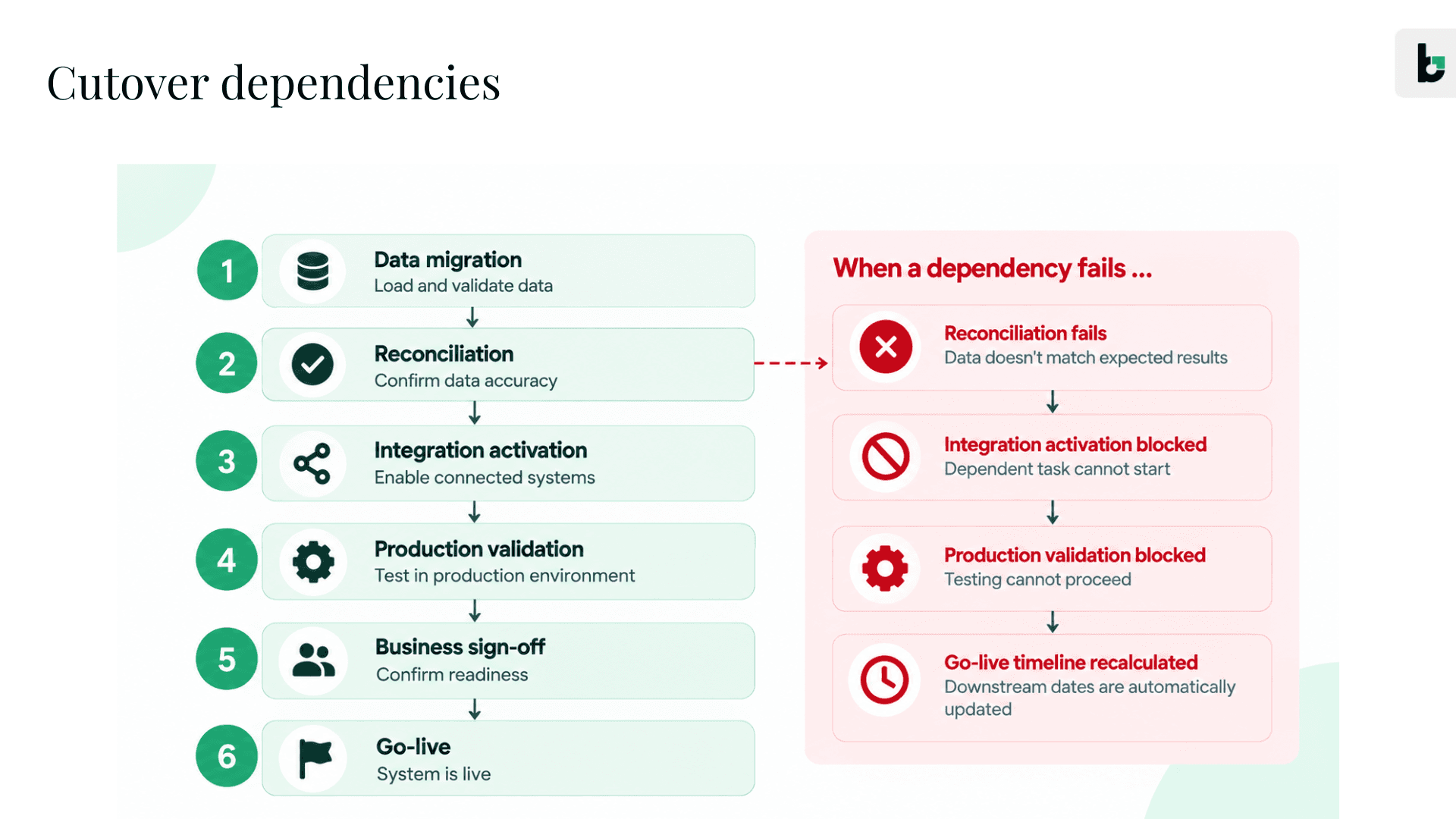
Deloitte's engineering guidance on cutover management puts real weight on this idea, defining the critical path as the longest sequence of activities from start to finish that must be completed to keep the cutover on schedule, and treating dependency mapping as something teams simply can't skip.
Readiness Changes During the Cutover
A readiness checklist is a snapshot. Cutover readiness is closer to a live feed.
At 9:00 AM, every box might be green. By 9:30, an integration that passed rehearsal fails against real production data. Now five downstream tasks that looked ready to go simply aren't executable anymore, because conditions moved and the plan didn't move with them.
Manual Coordination Makes Go-Live Timelines Unpredictable
Most of what happens during a live cutover window is a person doing the job of a coordination system. A project manager chasing three teams to confirm a task really finished. Checking whether a dependency actually completed, or whether someone just marked it done to stop being asked about it. Updating a spreadsheet that five other people are trying to read at the same time. Deciding, on the fly, whether a forty minute delay upstream means the 2 PM integration slot has to move.
None of that is planning. It's live, manual coordination performed by tired people under a countdown clock with incomplete visibility, and it's the biggest reason a well built cutover plan can still produce an unpredictable go-live.
Cutover often exposes work that wasn't fully finished earlier in the project. Maybe the data hasn't been reconciled, a requirement is still open, or an integration hasn't been tested in a realistic production scenario. The cutover window is simply where those gaps become impossible to ignore. Beacon has mapped these out in detail in Why Enterprise Software Implementations Fail: 10 Failure Points to Watch, and it's worth reading alongside this piece if you're trying to understand where cutover risk actually originates rather than just where it shows up.
Software Go-Live Planning: The Enterprise Software Cutover Planning Process
Before AI enters the picture at all, there's a software cutover go-live planning process that has to be right. Skipping straight to automation without this foundation is how teams end up automating chaos instead of removing it.
Assess Readiness and Define the Cutover Scope
Every solid cutover starts with an honest scope conversation, and that conversation is a core part of effective software go-live planning. What exactly is moving, on what date, across which systems, and what does "ready" actually mean for this specific go-live? This is also where teams should pull in the broader cutover checklist work, since a cutover plan built on top of unresolved requirements or unvalidated data starts from a weak position no matter how good the sequencing is. For a deeper look at what readiness actually requires before the cutover window opens, see Beacon's guide to why enterprise software implementations get stuck before go-live.
Map Dependencies and Build the Critical Path
This is the step most teams underinvest in, but it's central to a reliable cutover strategy. Someone needs to sit down and actually trace what depends on what, what can run in parallel to save time, what absolutely has to wait, and where the critical path runs through the whole plan. Panorama Consulting's guidance on multi-vendor ERP go-lives is a good example of this in practice, walking through how to coordinate dependencies across vendors and workstreams moving at different speeds toward the same date.
Sequence Tasks, Owners, and Timing
Once dependencies are mapped, the plan gets turned into an actual sequence. Every task gets a specific owner, a time window, and a place in the order of operations. This is usually where the traditional cutover checklist and broader software cutover plan start taking shape, and it's a necessary step, but a checklist alone still can't tell you if you're on track once the window opens.
Rehearse and Finalize the Cutover Strategy
No cutover plan should go into production without at least one rehearsal, making this a critical part of software go-live planning. Running a mock cutover surfaces the gaps that look fine on paper but fall apart in practice, and it's the single best way to pressure test your cutover strategy before it actually matters.
How to Build an Executable Software Cutover Plan
This is the hinge point of the whole article and an important distinction in software go-live planning. A plan gets a team organized. An executable plan is what actually makes a go-live predictable.
Define Preconditions and Completion Criteria
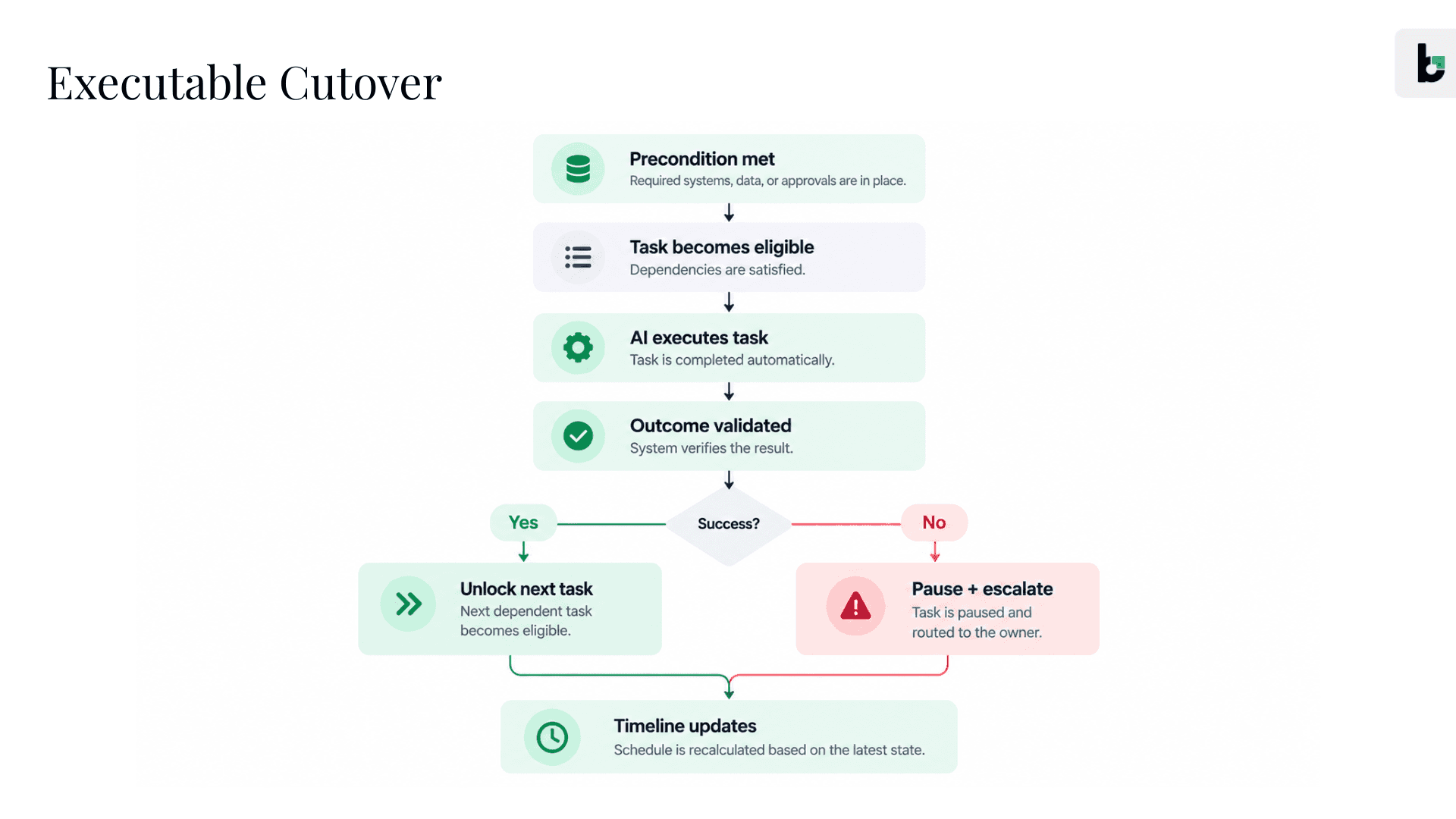
Most cutover plans list tasks the way a to do list would: "Migrate data." That's not executable, by a person or a system, because it doesn't say when it can start or how anyone knows it's genuinely finished. Compare it to something like this instead: source freeze confirmed, then execute migration, then validate record counts, then reconcile against source, then mark complete. That version has a trigger, an action, and a verification step, the minimum structure a task needs before it can be acted on reliably.
Turn Dependencies Into Execution Triggers
A traditional cutover plan might say 10:00, migrate data. An executable version looks more like this: source freeze confirmed, initiate migration, validate record counts, reconcile, unlock integration activation, escalate if reconciliation fails. Every dependency in the plan becomes a trigger that either fires the next step automatically or routes to a human when something doesn't check out.
Build a Time- and Owner-Based Cutover Runbook
This is the traditional runbook most cutover leads already build, but the shift worth making is treating it less like a printed document and more like a structure a system can track, trigger, and update in real time. That's the moment a static plan becomes a living workflow, and it's the same idea behind implementation orchestration more broadly: connecting the systems, people, dependencies, and sequencing into one coordinated layer instead of a document and a group chat.
How AI Executes the Enterprise Software Cutover
With the plan built this way, AI has something concrete to act on rather than a document it has to interpret.
Traditional cutover coordination looks like this: plan, assign, chase, confirm, update, react.
AI-executed cutover looks like this instead: define, trigger, execute, validate, adapt, escalate.
That shift, from chasing status to acting on triggers, is the single most important distinction in this entire article.
AI Determines What Can Happen Next
At any point during a cutover, the honest answer to "what should happen next" depends on a lot of shifting factors: which tasks have completed, whether their dependencies actually hold, whether timing constraints still apply, and whether any exceptions have been raised. An AI system built on top of an executable runbook can continuously check that state and surface exactly which tasks are cleared to move forward, instead of a person mentally re-running that logic every fifteen minutes under pressure.
AI Executes Tasks and Verifies Outcomes
Here's what this looks like as actual work, not just a concept. Based on Beacon's documented implementation capabilities, three examples show the pattern clearly:
Data readiness. Source freeze confirmed, so the platform validates data mappings and detects mismatches, then runs the migration sequence, then reconciles record counts against source, then either clears the next dependent task or routes the discrepancy to the data owner as an exception.
Cutover UAT. A configuration change is promoted to production, so the platform generates and executes UAT scenarios based on the customer's actual configuration, then validates the results against expected outcomes, then either signs off the workflow as production-ready or flags the specific failing scenario for a human to review.
Hypercare. Go-live completes, so the platform continues monitoring the same production workflows it just helped validate, then routes any post-launch issue to the right owner based on severity, then keeps that resolution loop running through the hypercare window instead of handing it off to a separate, disconnected support process.
That's the pattern behind Beacon's approach to implementation orchestration: trigger, action, verification, next action, repeated across the tasks that used to require a person to manually confirm each one.
AI Monitors Dependencies and the Critical Path
Instead of finding out three hours into the window that go-live is running late, a system watching the critical path continuously can flag the moment a single task starts drifting, and immediately work out what that drift means for everything downstream.
AI Handles Exceptions and Escalates When Needed
Here's how the exception path plays out in the data readiness example above: reconciliation fails, so the dependent integration activation task pauses automatically, the exception routes to the data owner with the specific mismatch flagged, a recovery action gets executed or approved, and the downstream timeline updates to reflect the delay. Nobody had to notice the failure by accident. Nobody had to guess what it affected.
This is the credible version of "AI helps with cutover." Not AI running everything unsupervised, but execute automatically, retry when it makes sense, pause when it doesn't, request approval, and escalate genuine exceptions to a person. That structure keeps humans in charge of the decisions that actually carry risk, while stripping out the coordination overhead around every one of those decisions. It's also the broader idea behind the shift from automation to AI-powered execution that's reshaping how professional services teams approach delivery work generally, not just cutover specifically.
How AI Makes Go-Live Timelines More Predictable
This is the part traditional cutover methodology has never been able to solve, mostly because it requires data a static plan simply doesn't have.
Replace Planned Durations With Actual Execution Signals
A traditional cutover plan says a task should take two hours, usually because that number got carried over from the last similar project or estimated months before anyone actually ran it. An AI-executed cutover can instead say the task has actually taken 75 minutes across rehearsals, and current execution is tracking eight minutes behind. That's not a guess, it's a measurement, and timelines built from measurements hold up a lot better than ones built from memory.
Continuously Recalculate the Cutover Timeline
When something slips, and something always slips, the useful question isn't whether the team is behind. It's which downstream tasks are actually affected, whether parallel work can keep going regardless, where the critical path has just shifted to, and what specifically needs a human's attention right now.
Detect Delays Before They Become Go-Live Risks
The goal isn't a dashboard that simply reports "task is late." It's a system that says a task is late, four downstream activities are affected, the expected go-live impact is 45 minutes, and here's a recommended recovery action pending approval. That's the real practice of go-live risk management, turning a delay into something actionable before it becomes a bigger problem, not just flagging it after the fact.
Maintain a Live Source of Truth During Cutover
No spreadsheet being edited by six people at once. No status updates scattered across Slack, email, and a call nobody can fully follow. When execution itself is the system of record, it becomes the single source of truth, because it isn't reporting on the work after the fact, it's the thing actually doing it.
Predictability here isn't just a feeling of things going smoothly, it's measurable. Beacon can measure the shift through implementation metrics such as on-time go-live rate, execution automation, and rework, giving delivery leaders a way to evaluate whether cutover execution is becoming more predictable.
Go-Live Readiness and Go/No-Go Decisions
Continuously Validate Technical, Data, and Integration Readiness
Is the production environment actually available? Has data been reconciled, not just moved? Do the integrations behave correctly against real production conditions, not just against a test environment that never quite matches?
Confirm Business Process Readiness
Do the people who have to operate the new system on day one actually understand how their work is changing? Has the business genuinely signed off on the workflows that matter most, not just the ones that happened to be easy to test?
Give Decision-Makers Evidence for Go/No-Go
The most important principle here is simple. AI should surface evidence, and humans should keep the decision authority. A useful readiness signal doesn't read "readiness: amber." It reads more like this: 96 percent of readiness conditions are complete, two critical integration conditions remain unresolved, four downstream workflows are affected, and the estimated go-live impact is 90 minutes. For the full framework behind this kind of enterprise software go-live readiness assessment, Beacon's guide on enterprise software go-live readiness goes deep into functional, data, integration, technical, user, and support readiness, so it's worth reading in full rather than repeating here.
Cutover Strategy: Rehearse, Roll Back, and Recover
Use Mock Cutovers to Measure Real Execution Time
Rehearsal is already a well established best practice, and Ceba Solutions' implementation methodology treats dry runs and migration validation as standard, non-negotiable parts of a credible cutover process. A plan that's never been rehearsed is still just a theory. The real value goes beyond confirming the process works, it's the execution data the rehearsal generates: how long each task actually took, where it slowed down, and exactly what failed and why.
Define Rollback Triggers and Recovery Paths
What specific condition, measured how, actually triggers a rollback? That needs to be agreed on before the cutover window opens, not debated in the middle of it.
Pause Dependent Work and Escalate Critical Failures
If a critical task fails, everything downstream of it should stop automatically rather than continuing on the hope it'll sort itself out. Rules, dependencies, execution, and human approval where it actually matters, working together.
From Cutover to Hypercare
Go-live isn't the finish line. It's the start of the stretch where a technically successful cutover can still turn into an operational headache if nobody's paying close attention.
Validate Production Workflows
The first real transactions in a new production environment are the actual test, more revealing than any amount of pre-go-live testing, because they're the real thing happening with real stakes.
Route and Resolve Post-Go-Live Issues
Issues in the days right after go-live need the same discipline as issues during cutover itself: clear ownership, clear escalation paths, and no ambiguity about who's handling what.
Continue the Execution Loop Into Hypercare
Hypercare isn't a separate phase that starts from a blank page. It's a natural continuation of the same execution and monitoring loop that ran the cutover.
A Practical Enterprise Software Cutover Checklist
Before cutover | During cutover | After cutover |
Production environment ready | Legacy system freeze confirmed | Production workflows validated with real transactions |
Data migration rehearsed | Migration executed and record counts validated | Issues routed and triaged by severity |
Critical integrations validated | Reconciliation passed | Hypercare coverage activated |
Owners confirmed for every task | Integrations activated and tested | Support ownership formally transferred |
Dependencies mapped and critical path identified | Critical workflows validated by the business | |
Rollback criteria agreed in advance | Exceptions escalated to named owners | |
Go/no-go criteria defined and shared | Go-live decision recorded with supporting evidence |
Enterprise Software Cutover Planning FAQs
What is enterprise software cutover planning?
It's the process of sequencing every task, dependency, and validation step needed to move a system from a legacy or pre-production state into live production, inside a defined window, with a way to roll back if something fails.
What should a software cutover plan include?
Tasks, owners, dependencies, timing, data migration steps, integration activation, validation checkpoints, rollback triggers, and a communication plan. Missing any one of these tends to be where cutovers run into trouble.
What is the difference between a cutover plan and a cutover runbook?
The plan defines what needs to happen and why. The runbook defines exactly how it happens, step by step, with owners and timing attached. An executable runbook goes a step further, structuring that detail so a system can track and act on it in real time.
When should a cutover rehearsal happen?
Before the production window, with enough time left to fix whatever the rehearsal exposes. A rehearsal that happens the night before go-live only tells you what's wrong, it doesn't leave time to fix it.
What are common enterprise software go-live risks?
Unresolved dependencies, data that technically migrated but wasn't fully validated, integrations that worked in testing but not against real production conditions, and cutover plans that were never actually rehearsed end to end.
How can AI improve software cutover planning and execution?
By turning a static plan into something that can be acted on directly, determining what's eligible to run next, executing and verifying tasks, monitoring the critical path continuously, and escalating exceptions to the right person instead of leaving a team to discover problems after the fact.
From Cutover Plan to Predictable Go-Live
A cutover plan defines the work. Dependencies define what can actually happen next. AI executes the eligible work, produces real-time evidence as it goes, and adapts the timeline the moment reality shifts, while humans stay in charge of the decisions and exceptions that genuinely need judgment. That's what makes a go-live predictable, not a better checklist, but a plan that can actually be executed, monitored, and adapted by the system while humans stay in control of decisions that require judgment.
If any of this sounds familiar, from chasing status across three tools to watching a task quietly slip and only learning its full impact hours later, it's worth seeing what changes when the plan becomes an executable workflow. Beacon's implementation orchestration platform is built around exactly that shift. If you're planning a go-live and want fewer surprises in that final window, it's worth seeing Beacon in action.
It's 11:40 PM. The go-live bridge call has been running since six. Someone on the data team just confirmed the final migration batch finished, but nobody can confirm whether the reconciliation report actually matched, because the person who normally runs that report is on a different call handling an integration issue. The project manager is toggling between three browser tabs: a shared spreadsheet, a Slack channel scrolling faster than anyone can read, and an email thread where someone from the client side is asking, politely but pointedly, whether they're still on track for the 6 AM cutover window.
Nothing has technically gone wrong yet. But nobody in that room could tell you, with confidence, exactly where things stand.
If you've run or sat through an enterprise go-live, you already know this scene. It doesn't matter whether it's SAP, an HCM platform, a core banking system, or a niche SaaS tool touching a dozen integrations. The plan was solid months ago.
Enterprise software cutover planning and software go-live planning are supposed to make this final window predictable. Yet even a detailed software cutover plan can break down when execution remains manual. The runbook was reviewed and signed off. And yet the final hours still come down to people manually chasing status, hoping the dependencies hold, and reacting in real time to whatever breaks.
That gap, between how carefully a go-live gets planned and how manually it actually gets executed, is where most enterprise cutovers lose their footing. Because the plan simply has no way of making sure it's followed once the clock starts.
A cutover plan tells you what should happen. Execution is what actually determines whether it does, and whether the team can adapt the moment reality drifts from the plan. This article walks through both halves properly: what a strong enterprise software cutover plan actually contains, and then what changes once AI starts executing that plan instead of just documenting it.
What Is Enterprise Software Cutover Planning Process?
Enterprise software cutover planning is the discipline of sequencing everything required to move a system, a business process, or an entire organization from an old state to a new one, inside a defined window, with a way back if something goes wrong.
It sits at the very end of an implementation, after configuration, testing, and data migration have all technically wrapped up. It's the last mile, and it's also the part of the project where the cost of a mistake is highest, because it usually happens in production, in front of real users, with real transactions on the line.
What Does a Software Cutover Plan Include?
A real cutover plan for an enterprise system, whether it's ERP, HCM, CRM, or a core platform, generally covers the same core building blocks:
Tasks, meaning every discrete action that has to happen, from freezing the legacy system to processing the first live transaction
Owners, a named person or team accountable for each task, not just a department name
Dependencies, what has to finish before something else is allowed to start
Timing, when each task runs and how much slack sits around it
Data, the final extraction, migration, and load activities
Integrations, the connections to other systems that need to be switched on and trusted
Validation, proof that a step actually worked, not just that someone attempted it
Rollback, what happens if a step fails badly enough that the team needs to reverse course
Communications, who needs to know what, and when
None of this is exotic. Oracle's own guidance on cutover planning makes a similar point, recommending that planning start months in advance and that teams document every task and handover in detail, especially when multiple systems are going live at the same time.
Cutover Plan vs. Cutover Runbook: What's the Difference?
People tend to use these two words interchangeably, but they're answering different questions.
The plan describes what needs to happen: the scope, the sequence, the dependencies, the risks worth worrying about.
The runbook describes how it actually gets executed: the exact steps, in the exact order, with clear verification criteria, organized by time and owner so anyone can pick it up mid-cutover and know exactly where things stand.
There's a third idea worth introducing here, because it's the one most cutover documents are quietly missing: an executable runbook. That's a runbook whose tasks, dependencies, conditions, and outcomes can actually be acted on and monitored by an execution system, not just read by someone holding a printed copy at 2 AM. That distinction is what the rest of this article builds on.
Why Enterprise Software Go-Lives Become Unpredictable
A go-live rarely falls apart all at once. More often, small delays start stacking up while teams try to coordinate everything manually.
Cutover Is a Network of Dependencies
Picture a typical enterprise cutover sequence: data migration, then reconciliation, then integration activation, then production validation, then business sign-off. Each of those steps depends on the one before it, and a single delay anywhere in that chain doesn't stay contained. It spreads.
Deloitte's engineering guidance on cutover management puts real weight on this idea, defining the critical path as the longest sequence of activities from start to finish that must be completed to keep the cutover on schedule, and treating dependency mapping as something teams simply can't skip.
Readiness Changes During the Cutover
A readiness checklist is a snapshot. Cutover readiness is closer to a live feed.
At 9:00 AM, every box might be green. By 9:30, an integration that passed rehearsal fails against real production data. Now five downstream tasks that looked ready to go simply aren't executable anymore, because conditions moved and the plan didn't move with them.
Manual Coordination Makes Go-Live Timelines Unpredictable
Most of what happens during a live cutover window is a person doing the job of a coordination system. A project manager chasing three teams to confirm a task really finished. Checking whether a dependency actually completed, or whether someone just marked it done to stop being asked about it. Updating a spreadsheet that five other people are trying to read at the same time. Deciding, on the fly, whether a forty minute delay upstream means the 2 PM integration slot has to move.
None of that is planning. It's live, manual coordination performed by tired people under a countdown clock with incomplete visibility, and it's the biggest reason a well built cutover plan can still produce an unpredictable go-live.
Cutover often exposes work that wasn't fully finished earlier in the project. Maybe the data hasn't been reconciled, a requirement is still open, or an integration hasn't been tested in a realistic production scenario. The cutover window is simply where those gaps become impossible to ignore. Beacon has mapped these out in detail in Why Enterprise Software Implementations Fail: 10 Failure Points to Watch, and it's worth reading alongside this piece if you're trying to understand where cutover risk actually originates rather than just where it shows up.
Software Go-Live Planning: The Enterprise Software Cutover Planning Process
Before AI enters the picture at all, there's a software cutover go-live planning process that has to be right. Skipping straight to automation without this foundation is how teams end up automating chaos instead of removing it.
Assess Readiness and Define the Cutover Scope
Every solid cutover starts with an honest scope conversation, and that conversation is a core part of effective software go-live planning. What exactly is moving, on what date, across which systems, and what does "ready" actually mean for this specific go-live? This is also where teams should pull in the broader cutover checklist work, since a cutover plan built on top of unresolved requirements or unvalidated data starts from a weak position no matter how good the sequencing is. For a deeper look at what readiness actually requires before the cutover window opens, see Beacon's guide to why enterprise software implementations get stuck before go-live.
Map Dependencies and Build the Critical Path
This is the step most teams underinvest in, but it's central to a reliable cutover strategy. Someone needs to sit down and actually trace what depends on what, what can run in parallel to save time, what absolutely has to wait, and where the critical path runs through the whole plan. Panorama Consulting's guidance on multi-vendor ERP go-lives is a good example of this in practice, walking through how to coordinate dependencies across vendors and workstreams moving at different speeds toward the same date.
Sequence Tasks, Owners, and Timing
Once dependencies are mapped, the plan gets turned into an actual sequence. Every task gets a specific owner, a time window, and a place in the order of operations. This is usually where the traditional cutover checklist and broader software cutover plan start taking shape, and it's a necessary step, but a checklist alone still can't tell you if you're on track once the window opens.
Rehearse and Finalize the Cutover Strategy
No cutover plan should go into production without at least one rehearsal, making this a critical part of software go-live planning. Running a mock cutover surfaces the gaps that look fine on paper but fall apart in practice, and it's the single best way to pressure test your cutover strategy before it actually matters.
How to Build an Executable Software Cutover Plan
This is the hinge point of the whole article and an important distinction in software go-live planning. A plan gets a team organized. An executable plan is what actually makes a go-live predictable.
Define Preconditions and Completion Criteria
Most cutover plans list tasks the way a to do list would: "Migrate data." That's not executable, by a person or a system, because it doesn't say when it can start or how anyone knows it's genuinely finished. Compare it to something like this instead: source freeze confirmed, then execute migration, then validate record counts, then reconcile against source, then mark complete. That version has a trigger, an action, and a verification step, the minimum structure a task needs before it can be acted on reliably.
Turn Dependencies Into Execution Triggers
A traditional cutover plan might say 10:00, migrate data. An executable version looks more like this: source freeze confirmed, initiate migration, validate record counts, reconcile, unlock integration activation, escalate if reconciliation fails. Every dependency in the plan becomes a trigger that either fires the next step automatically or routes to a human when something doesn't check out.
Build a Time- and Owner-Based Cutover Runbook
This is the traditional runbook most cutover leads already build, but the shift worth making is treating it less like a printed document and more like a structure a system can track, trigger, and update in real time. That's the moment a static plan becomes a living workflow, and it's the same idea behind implementation orchestration more broadly: connecting the systems, people, dependencies, and sequencing into one coordinated layer instead of a document and a group chat.
How AI Executes the Enterprise Software Cutover
With the plan built this way, AI has something concrete to act on rather than a document it has to interpret.
Traditional cutover coordination looks like this: plan, assign, chase, confirm, update, react.
AI-executed cutover looks like this instead: define, trigger, execute, validate, adapt, escalate.
That shift, from chasing status to acting on triggers, is the single most important distinction in this entire article.
AI Determines What Can Happen Next
At any point during a cutover, the honest answer to "what should happen next" depends on a lot of shifting factors: which tasks have completed, whether their dependencies actually hold, whether timing constraints still apply, and whether any exceptions have been raised. An AI system built on top of an executable runbook can continuously check that state and surface exactly which tasks are cleared to move forward, instead of a person mentally re-running that logic every fifteen minutes under pressure.
AI Executes Tasks and Verifies Outcomes
Here's what this looks like as actual work, not just a concept. Based on Beacon's documented implementation capabilities, three examples show the pattern clearly:
Data readiness. Source freeze confirmed, so the platform validates data mappings and detects mismatches, then runs the migration sequence, then reconciles record counts against source, then either clears the next dependent task or routes the discrepancy to the data owner as an exception.
Cutover UAT. A configuration change is promoted to production, so the platform generates and executes UAT scenarios based on the customer's actual configuration, then validates the results against expected outcomes, then either signs off the workflow as production-ready or flags the specific failing scenario for a human to review.
Hypercare. Go-live completes, so the platform continues monitoring the same production workflows it just helped validate, then routes any post-launch issue to the right owner based on severity, then keeps that resolution loop running through the hypercare window instead of handing it off to a separate, disconnected support process.
That's the pattern behind Beacon's approach to implementation orchestration: trigger, action, verification, next action, repeated across the tasks that used to require a person to manually confirm each one.
AI Monitors Dependencies and the Critical Path
Instead of finding out three hours into the window that go-live is running late, a system watching the critical path continuously can flag the moment a single task starts drifting, and immediately work out what that drift means for everything downstream.
AI Handles Exceptions and Escalates When Needed
Here's how the exception path plays out in the data readiness example above: reconciliation fails, so the dependent integration activation task pauses automatically, the exception routes to the data owner with the specific mismatch flagged, a recovery action gets executed or approved, and the downstream timeline updates to reflect the delay. Nobody had to notice the failure by accident. Nobody had to guess what it affected.
This is the credible version of "AI helps with cutover." Not AI running everything unsupervised, but execute automatically, retry when it makes sense, pause when it doesn't, request approval, and escalate genuine exceptions to a person. That structure keeps humans in charge of the decisions that actually carry risk, while stripping out the coordination overhead around every one of those decisions. It's also the broader idea behind the shift from automation to AI-powered execution that's reshaping how professional services teams approach delivery work generally, not just cutover specifically.
How AI Makes Go-Live Timelines More Predictable
This is the part traditional cutover methodology has never been able to solve, mostly because it requires data a static plan simply doesn't have.
Replace Planned Durations With Actual Execution Signals
A traditional cutover plan says a task should take two hours, usually because that number got carried over from the last similar project or estimated months before anyone actually ran it. An AI-executed cutover can instead say the task has actually taken 75 minutes across rehearsals, and current execution is tracking eight minutes behind. That's not a guess, it's a measurement, and timelines built from measurements hold up a lot better than ones built from memory.
Continuously Recalculate the Cutover Timeline
When something slips, and something always slips, the useful question isn't whether the team is behind. It's which downstream tasks are actually affected, whether parallel work can keep going regardless, where the critical path has just shifted to, and what specifically needs a human's attention right now.
Detect Delays Before They Become Go-Live Risks
The goal isn't a dashboard that simply reports "task is late." It's a system that says a task is late, four downstream activities are affected, the expected go-live impact is 45 minutes, and here's a recommended recovery action pending approval. That's the real practice of go-live risk management, turning a delay into something actionable before it becomes a bigger problem, not just flagging it after the fact.
Maintain a Live Source of Truth During Cutover
No spreadsheet being edited by six people at once. No status updates scattered across Slack, email, and a call nobody can fully follow. When execution itself is the system of record, it becomes the single source of truth, because it isn't reporting on the work after the fact, it's the thing actually doing it.
Predictability here isn't just a feeling of things going smoothly, it's measurable. Beacon can measure the shift through implementation metrics such as on-time go-live rate, execution automation, and rework, giving delivery leaders a way to evaluate whether cutover execution is becoming more predictable.
Go-Live Readiness and Go/No-Go Decisions
Continuously Validate Technical, Data, and Integration Readiness
Is the production environment actually available? Has data been reconciled, not just moved? Do the integrations behave correctly against real production conditions, not just against a test environment that never quite matches?
Confirm Business Process Readiness
Do the people who have to operate the new system on day one actually understand how their work is changing? Has the business genuinely signed off on the workflows that matter most, not just the ones that happened to be easy to test?
Give Decision-Makers Evidence for Go/No-Go
The most important principle here is simple. AI should surface evidence, and humans should keep the decision authority. A useful readiness signal doesn't read "readiness: amber." It reads more like this: 96 percent of readiness conditions are complete, two critical integration conditions remain unresolved, four downstream workflows are affected, and the estimated go-live impact is 90 minutes. For the full framework behind this kind of enterprise software go-live readiness assessment, Beacon's guide on enterprise software go-live readiness goes deep into functional, data, integration, technical, user, and support readiness, so it's worth reading in full rather than repeating here.
Cutover Strategy: Rehearse, Roll Back, and Recover
Use Mock Cutovers to Measure Real Execution Time
Rehearsal is already a well established best practice, and Ceba Solutions' implementation methodology treats dry runs and migration validation as standard, non-negotiable parts of a credible cutover process. A plan that's never been rehearsed is still just a theory. The real value goes beyond confirming the process works, it's the execution data the rehearsal generates: how long each task actually took, where it slowed down, and exactly what failed and why.
Define Rollback Triggers and Recovery Paths
What specific condition, measured how, actually triggers a rollback? That needs to be agreed on before the cutover window opens, not debated in the middle of it.
Pause Dependent Work and Escalate Critical Failures
If a critical task fails, everything downstream of it should stop automatically rather than continuing on the hope it'll sort itself out. Rules, dependencies, execution, and human approval where it actually matters, working together.
From Cutover to Hypercare
Go-live isn't the finish line. It's the start of the stretch where a technically successful cutover can still turn into an operational headache if nobody's paying close attention.
Validate Production Workflows
The first real transactions in a new production environment are the actual test, more revealing than any amount of pre-go-live testing, because they're the real thing happening with real stakes.
Route and Resolve Post-Go-Live Issues
Issues in the days right after go-live need the same discipline as issues during cutover itself: clear ownership, clear escalation paths, and no ambiguity about who's handling what.
Continue the Execution Loop Into Hypercare
Hypercare isn't a separate phase that starts from a blank page. It's a natural continuation of the same execution and monitoring loop that ran the cutover.
A Practical Enterprise Software Cutover Checklist
Before cutover | During cutover | After cutover |
Production environment ready | Legacy system freeze confirmed | Production workflows validated with real transactions |
Data migration rehearsed | Migration executed and record counts validated | Issues routed and triaged by severity |
Critical integrations validated | Reconciliation passed | Hypercare coverage activated |
Owners confirmed for every task | Integrations activated and tested | Support ownership formally transferred |
Dependencies mapped and critical path identified | Critical workflows validated by the business | |
Rollback criteria agreed in advance | Exceptions escalated to named owners | |
Go/no-go criteria defined and shared | Go-live decision recorded with supporting evidence |
Enterprise Software Cutover Planning FAQs
What is enterprise software cutover planning?
It's the process of sequencing every task, dependency, and validation step needed to move a system from a legacy or pre-production state into live production, inside a defined window, with a way to roll back if something fails.
What should a software cutover plan include?
Tasks, owners, dependencies, timing, data migration steps, integration activation, validation checkpoints, rollback triggers, and a communication plan. Missing any one of these tends to be where cutovers run into trouble.
What is the difference between a cutover plan and a cutover runbook?
The plan defines what needs to happen and why. The runbook defines exactly how it happens, step by step, with owners and timing attached. An executable runbook goes a step further, structuring that detail so a system can track and act on it in real time.
When should a cutover rehearsal happen?
Before the production window, with enough time left to fix whatever the rehearsal exposes. A rehearsal that happens the night before go-live only tells you what's wrong, it doesn't leave time to fix it.
What are common enterprise software go-live risks?
Unresolved dependencies, data that technically migrated but wasn't fully validated, integrations that worked in testing but not against real production conditions, and cutover plans that were never actually rehearsed end to end.
How can AI improve software cutover planning and execution?
By turning a static plan into something that can be acted on directly, determining what's eligible to run next, executing and verifying tasks, monitoring the critical path continuously, and escalating exceptions to the right person instead of leaving a team to discover problems after the fact.
From Cutover Plan to Predictable Go-Live
A cutover plan defines the work. Dependencies define what can actually happen next. AI executes the eligible work, produces real-time evidence as it goes, and adapts the timeline the moment reality shifts, while humans stay in charge of the decisions and exceptions that genuinely need judgment. That's what makes a go-live predictable, not a better checklist, but a plan that can actually be executed, monitored, and adapted by the system while humans stay in control of decisions that require judgment.
If any of this sounds familiar, from chasing status across three tools to watching a task quietly slip and only learning its full impact hours later, it's worth seeing what changes when the plan becomes an executable workflow. Beacon's implementation orchestration platform is built around exactly that shift. If you're planning a go-live and want fewer surprises in that final window, it's worth seeing Beacon in action.







Copyright © 2026 Beacon.li. All rights reserved.
Copyright © 2026 Beacon.li. All rights reserved.
