The Enterprise SaaS Implementation
Checklist: from Kickoff to Go-live
8 phases, 80+ checklist items, and the complete SaaS implementation workflow your team needs to
go from signed contract to successful go-live, consistently.
Download PDF
Enterprise SaaS implementation is the end-to-end process of deploying and configuring enterprise software, from requirements gathering through go-live and post-launch support. Understanding the full SaaS implementation lifecycle is what separates teams that hit their go-live dates from those that miss them by months.
Most enterprise SaaS deployments fail not because the software is bad, but because implementation is treated as a people problem instead of a systems problem. The gap between a signed contract and a successful go-live is where budgets overrun, consultants burn out, and customers churn before seeing any value. This guide is the SaaS implementation best practices reference your team can use on every engagement
What should a SaaS onboarding checklist capture in the requirements phase?
Requirements gathering is the most underinvested phase in the SaaS implementation process and the most expensive to get wrong. Every ambiguous requirement from an intake call becomes a rework cycle in configuration. Every undocumented business rule becomes a support ticket in hypercare.
The goal is not just documentation. It is translating what a customer says they want into a precise, field-level specification your team can execute against, regardless of which consultant is running the engagement. This is the foundation of any repeatable SaaS implementation workflow.
Most SaaS Implementations Break Down at the Requirements Stage
Unstructured requirements create ambiguity, rework, and inconsistent outcomes across every downstream phase.
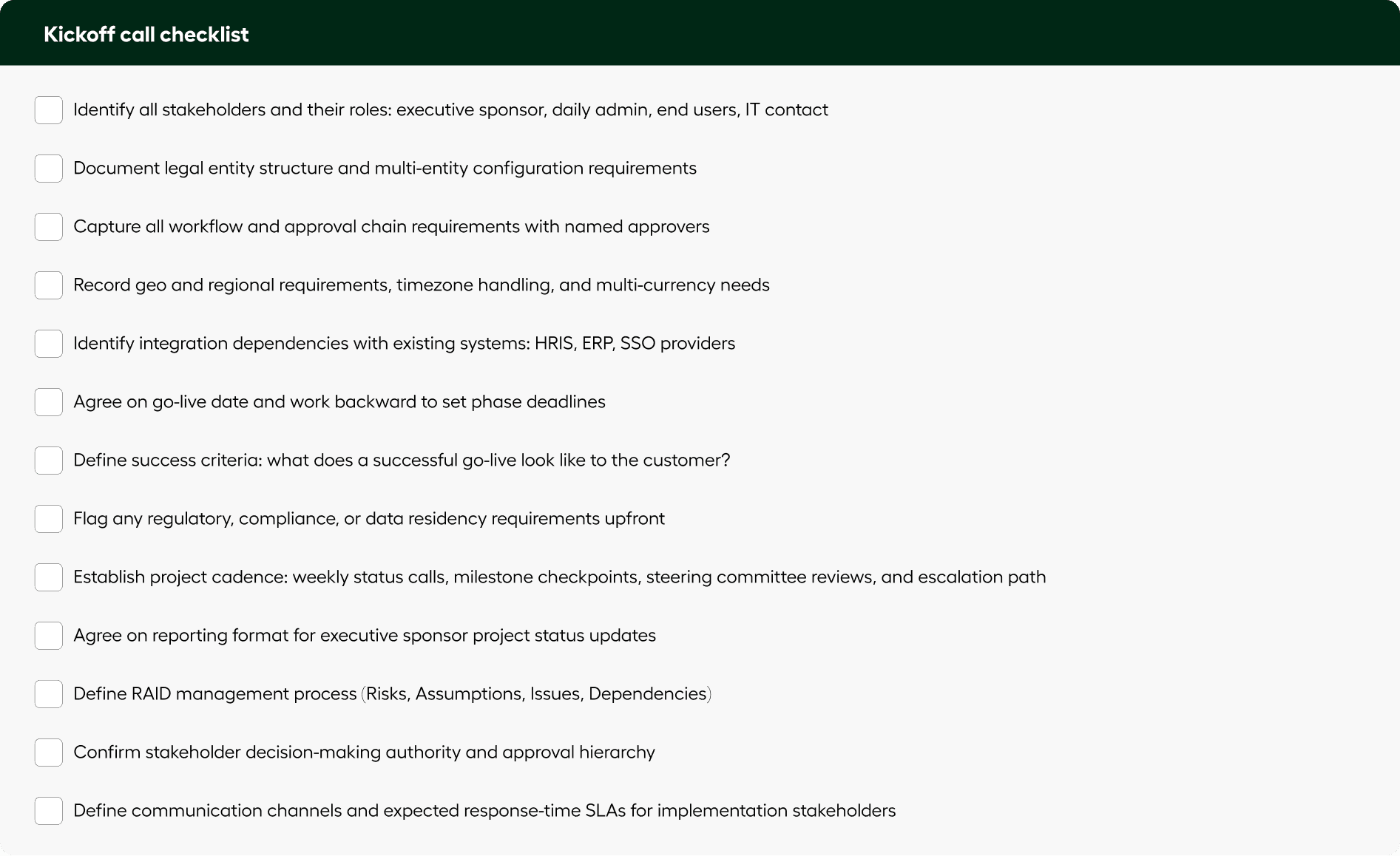
Why Raw Call Notes Are Not a Requirements Document
Notes must be converted into structured, field-level specifications with clear logic and validation before execution
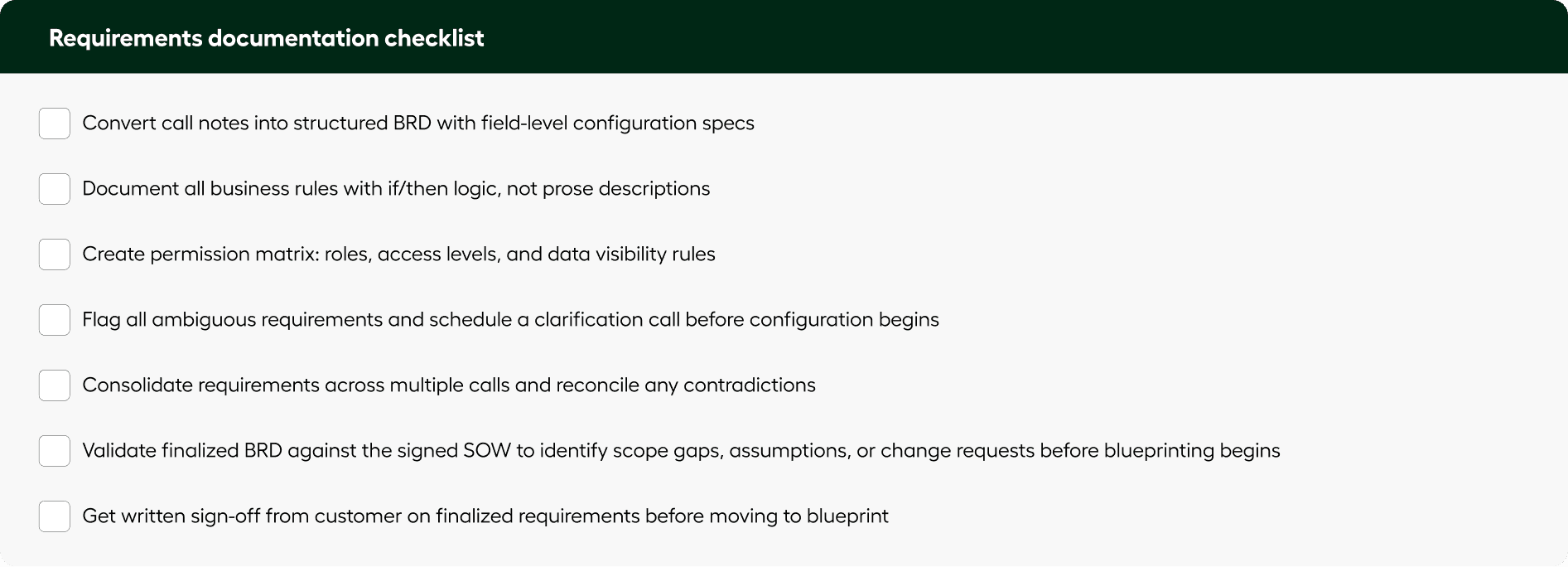
How to Automate SaaS Requirements Gathering and Documentation
Automating requirements gathering involves converting stakeholder conversations into structured, field-level specifications that can be directly executed.
Beacon converts calls into structured requirement specs, permission matrices, and SoWs instantly. It maps requirements directly to product configuration fields and flags contradictions across sessions. What was previously dependent on individual consultants becomes a repeatable system.
What should a SaaS implementation blueprint cover, and how does it differ from a BRD?
The blueprint phase translates approved requirements into a technical design that specifies exactly which fields to configure, with which values, under which conditions. It is not a summary of what the customer wants. It is an executable specification, and it is the single most important document in the SaaS implementation lifecycle.
A Business Requirements Document captures what the business needs the system to do. A System Design Document specifies how the system will be configured to meet those requirements. Enterprise implementations need both. Teams that skip the blueprint phase consistently report higher rates of configuration rework, testing failures, and delayed go-lives.
Without a Clear Blueprint, Configuration Becomes Guesswork
A blueprint defines exactly what needs to be configured, in what order, and under which conditions. Depending on implementation complexity, the blueprint may be documented as a System Design Document (SDD) or Functional Design Document (FDD). These documents translate approved business requirements into implementation-ready configuration instructions, workflow logic, validation behavior, integration sequencing, and exception handling rules.
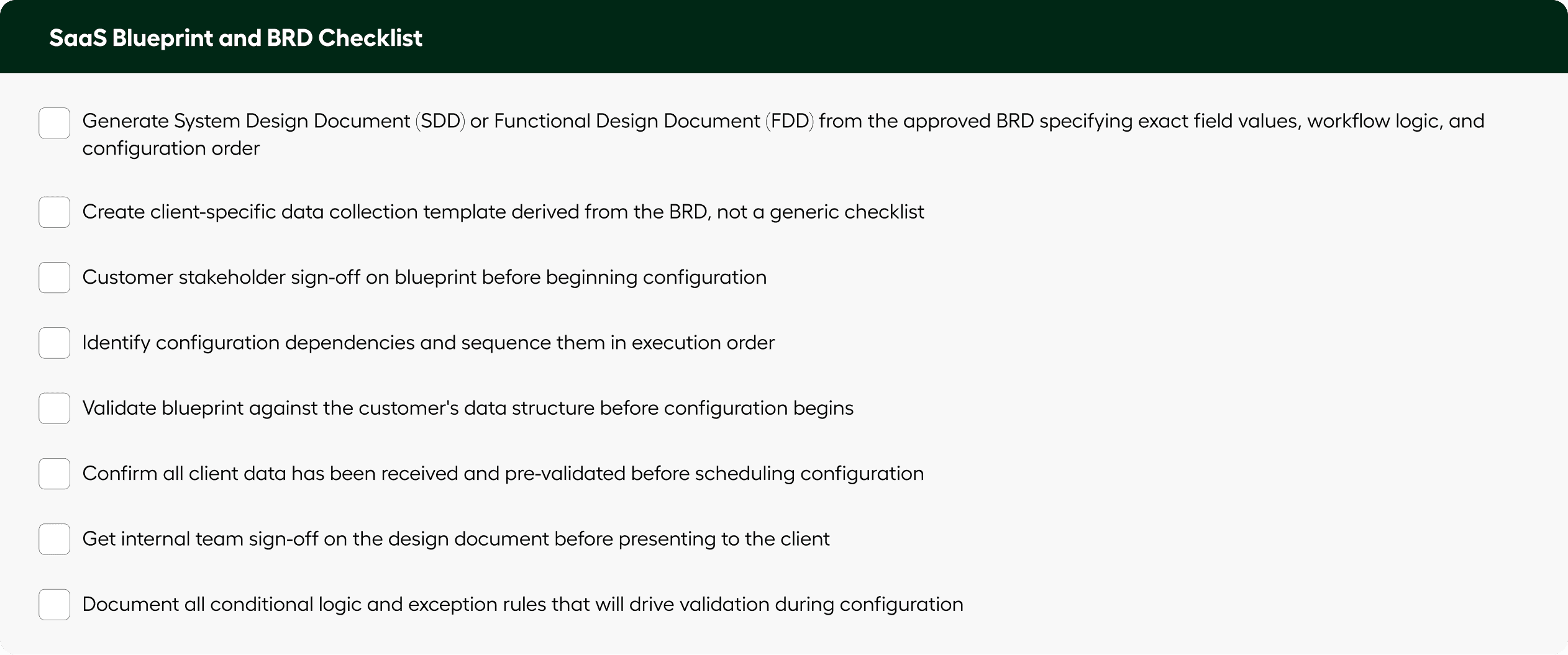
Common mistake: Sending a customer a generic spreadsheet instead of a specification-derived data collection template is one of the leading causes of back-and-forth delays in the SaaS onboarding process. Templates built directly from the BRD reduce collection cycle time significantly.
How to Generate an Implementation Blueprint from Requirements
An implementation blueprint is generated by translating approved requirements into field-level configuration instructions with defined logic and execution order.
Beacon creates implementation-ready design documents directly from requirements. It also generates client-specific data collection templates with built-in validation, reducing delays in data intake and preparation.
How long does enterprise SaaS configuration take, and what are the best practices for reducing it?
Configuration is the most time-consuming phase in an enterprise SaaS implementation. It involves translating an approved blueprint into a live, functional environment by setting up workflows, permissions, approval chains, data structures, reporting hierarchies, and UI settings exactly as specified. This is the operational core of the SaaS implementation workflow.
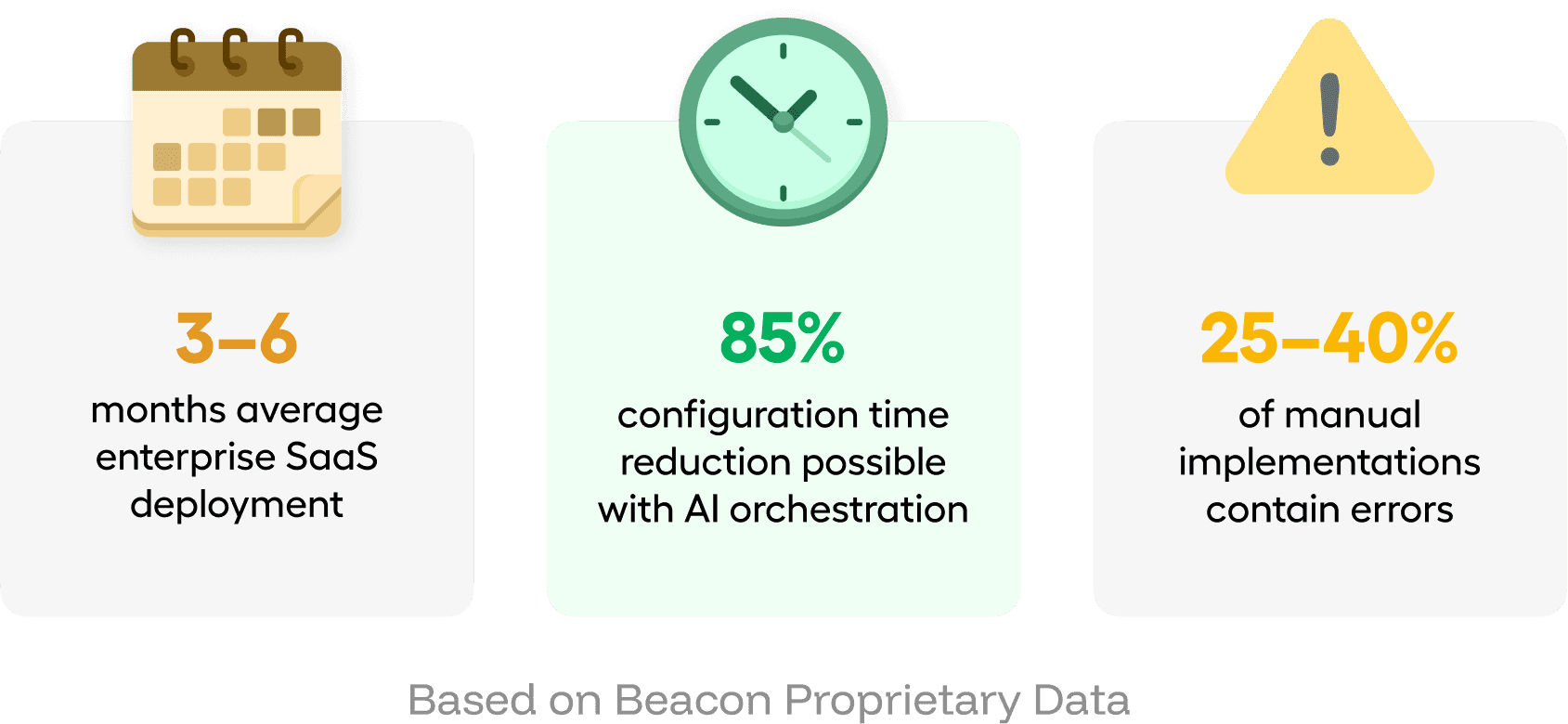
Manual configuration is slow, error-prone, and entirely dependent on individual consultant expertise. Studies and vendor data consistently show error rates of 25 to 40 percent in manually configured environments. One of the core SaaS implementation best practices is to drive configuration from the specification document rather than from memory or institutional knowledge
Manual Configuration Is the Biggest Bottleneck in SaaS Implementation
Configuration takes the most time and introduces the most errors when driven by memory instead of specification.
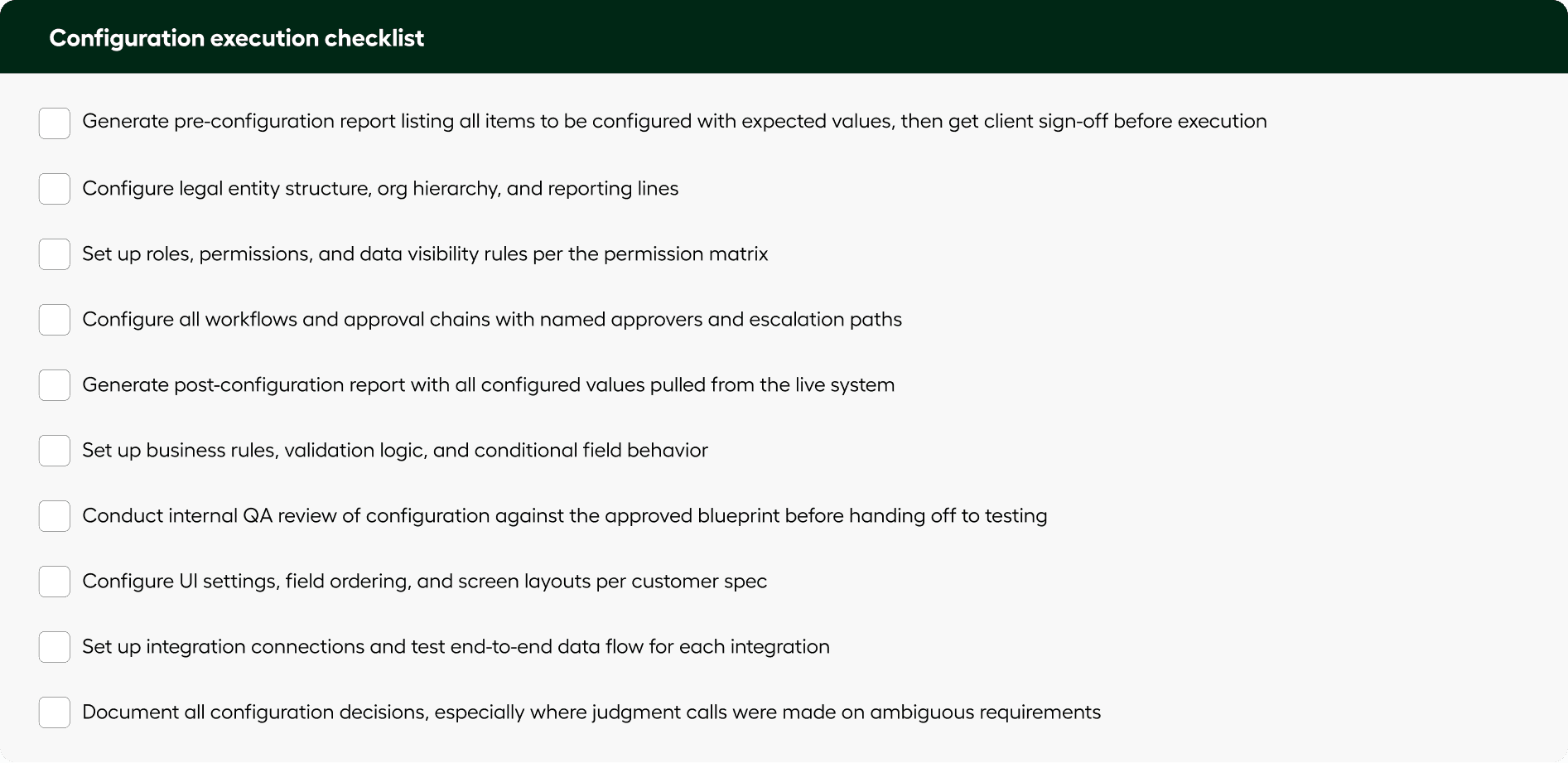
How to Reduce SaaS Configuration Time by 80 Percent
Reducing configuration time requires executing directly from approved specifications instead of manual setup, eliminating rework and inconsistency.
Beacon executes configuration inside the product UI from the approved specification. It generates pre-configuration reports, handles ambiguity with human input, and produces a complete audit trail. Tasks that take days manually can run in minutes with consistent accuracy.
What does a SaaS implementation data migration checklist need to cover to avoid irreversible errors?
Data migration is the highest-risk phase in the SaaS implementation lifecycle because mistakes here are often irreversible. A configuration error can be redone. A poorly validated data migration can corrupt production data, trigger compliance failures, or require mnths of cleanup after the customer has already gone live.v
A robust enterprise data migration runs in four stages: extraction and profiling, transformation and mapping, validation and pre-migration reporting, and execution with failure handling. Collapsing these stages is one of the most common violations of SaaS implementation best practices and a leading cause of go-live delays.
Data Migration Errors Are the Hardest to Recover From
Unlike configuration issues, migration mistakes can corrupt production data and require significant cleanup.
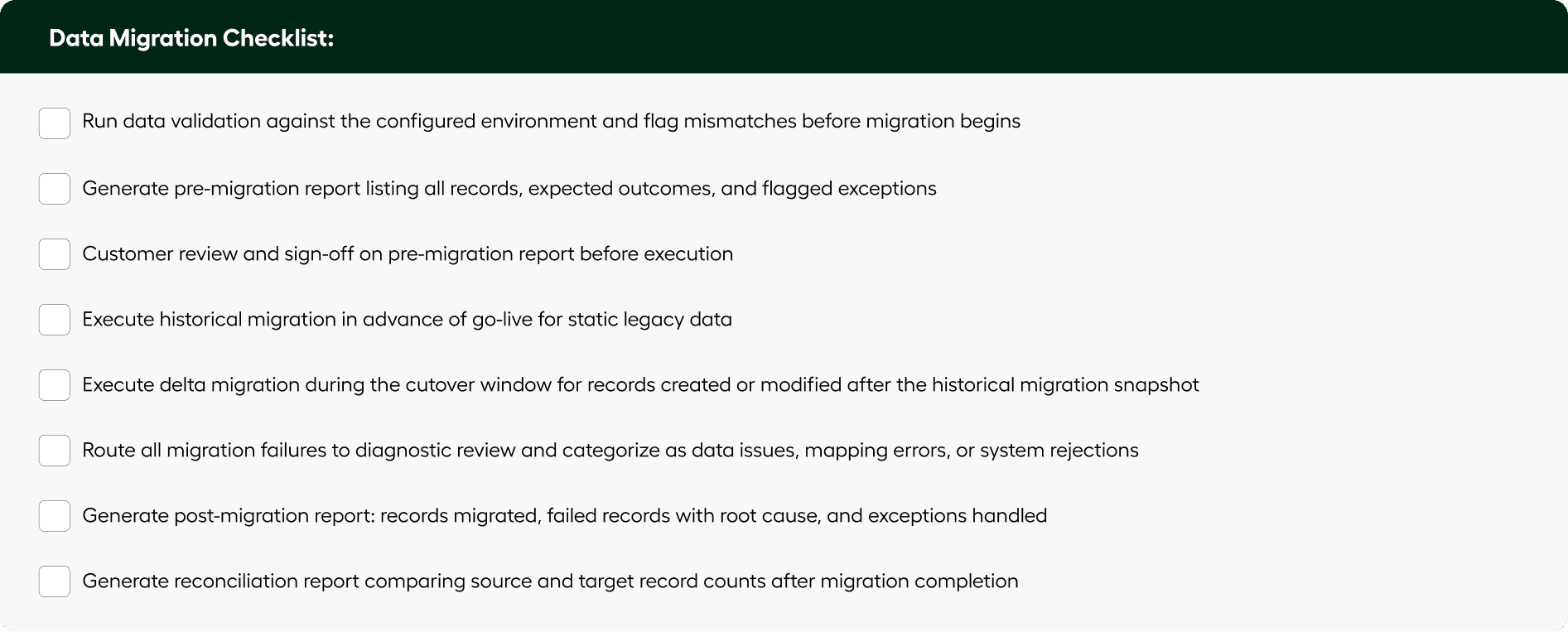
Common mistake: Skipping the pre-migration validation gate. Teams that proceed directly from transformation to execution without a validation report and customer sign-off consistently see higher failure rates and post-migration disputes. The report protects both parties.
How to Avoid Data Migration Errors in SaaS Implementation
Avoiding data migration errors requires validating data before execution and handling failures with structured diagnostics and retry logic.
Beacon uses agentic ETL where AI generates transformation logic and automation executes migration at scale. It validates data before migration, categorizes failures, and produces audit-ready reports, ensuring safe and reliable data movement.
How do you run UAT for enterprise SaaS implementations without using generic test templates?
UAT is the final validation gate before go-live in any SaaS implementation workflow. It is also the phase most likely to be rushed when timelines are under pressure. Generic test templates that do not reflect the customer's specific configuration are one of the most common failures in the SaaS implementation process, leading to missed defects, rework after go-live, and damaged customer confidence.
Functional testing, run by the implementation team, verifies that the system performs as technically specified. UAT, run with customer involvement, verifies that the configured system serves the actual business workflows the customer will use in production. Both are necessary. A system can pass functional testing and still fail UAT if the configuration does not match how the business actually operates.
Generic Testing Is Why Issues Surface After Go-Live
Testing that does not reflect actual configuration and workflows fails to catch real-world defects.
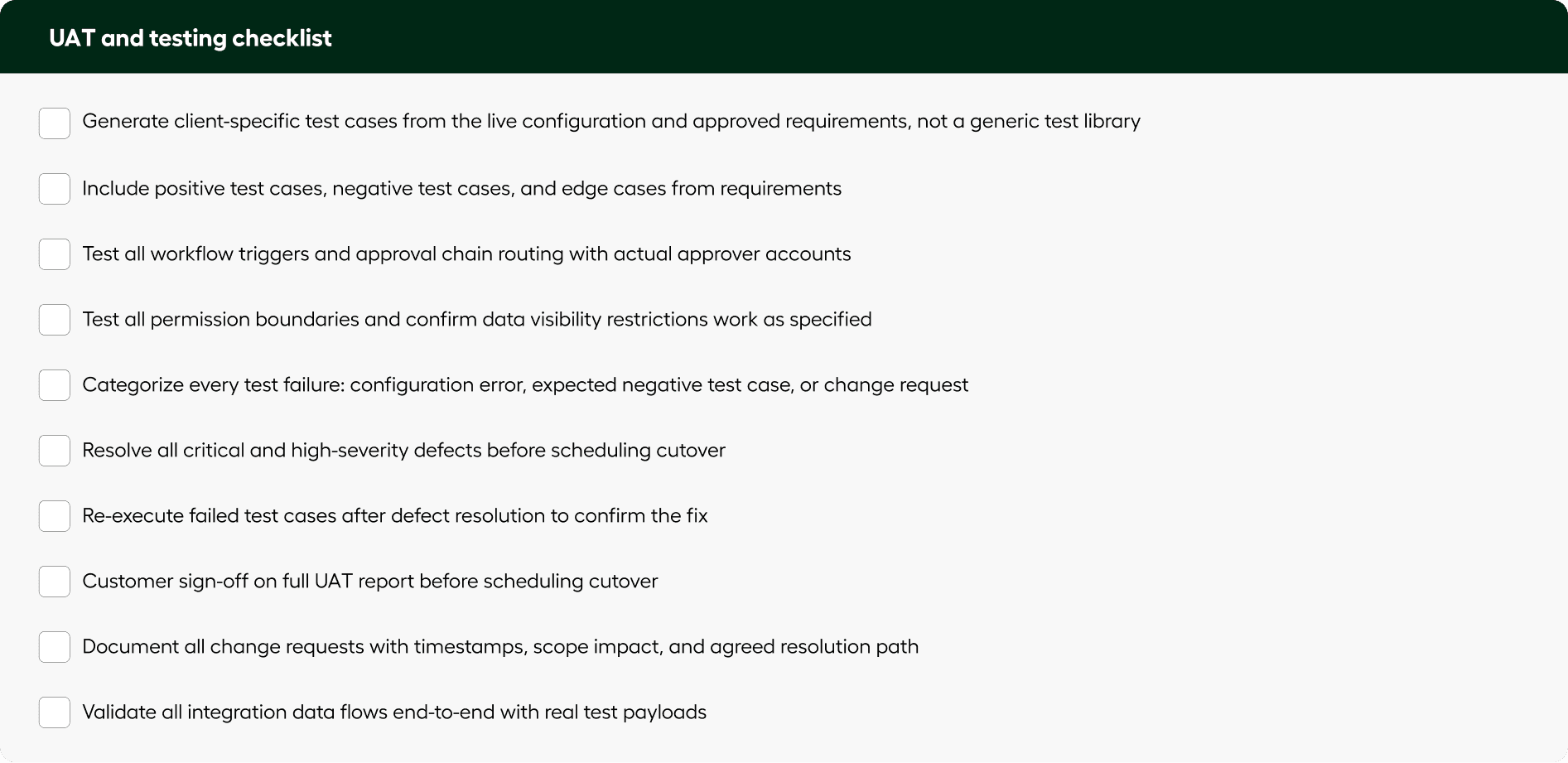
How to Run UAT Without Generic Test Templates
Effective UAT requires generating test cases from actual configuration and requirements rather than using generic templates.
Beacon generates test cases directly from the live system configuration and requirement specs. It categorizes failures automatically and produces audit-ready reports without manual effort.
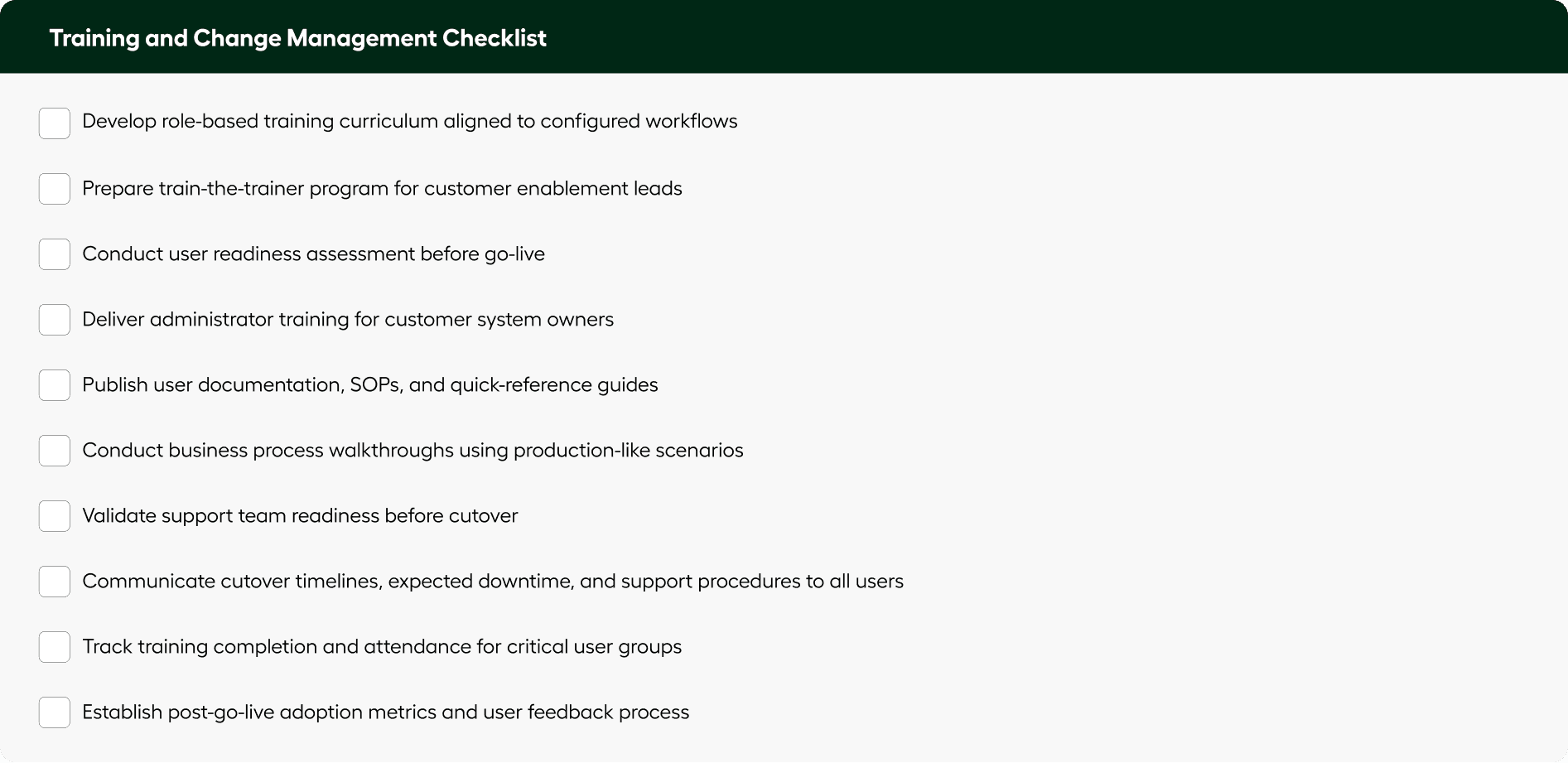
Why Training and Change Management Are Critical Before SaaS Go-Live
Technical readiness alone does not guarantee implementation success. Enterprise SaaS deployments fail adoption targets when end users are not trained, business process changes are not communicated, or operational teams are not prepared to support the new workflows.
Training and change management ensure users understand not just how to use the system, but how business processes and responsibilities will change after go-live.
User Readiness Is a Leading Indicator of Go-Live Success
Organizations with structured enablement programs consistently achieve smoother adoption, lower support ticket volumes, and faster time-to-value after launch.
What does a SaaS go-live checklist need to include to avoid configuration drift in production?
Cutover is the highest-stakes moment in the SaaS implementation lifecycle. It involves moving from a tested staging environment to a live production system, often within a defined cutover window with real business users waiting and no tolerance for errors.
The most common source of cutover failures is configuration drift: what was tested in staging is not what gets deployed in production, because the production setup is done manually from memory rather than from the same specification that drove staging. A sound SaaS go-live checklist eliminates this risk by treating production configuration as a first-class execution step, not a copy-paste job.
Go-Live Fails When Production Does Not Match What Was Tested
Configuration drift between staging and production is one of the most common and preventable risks.
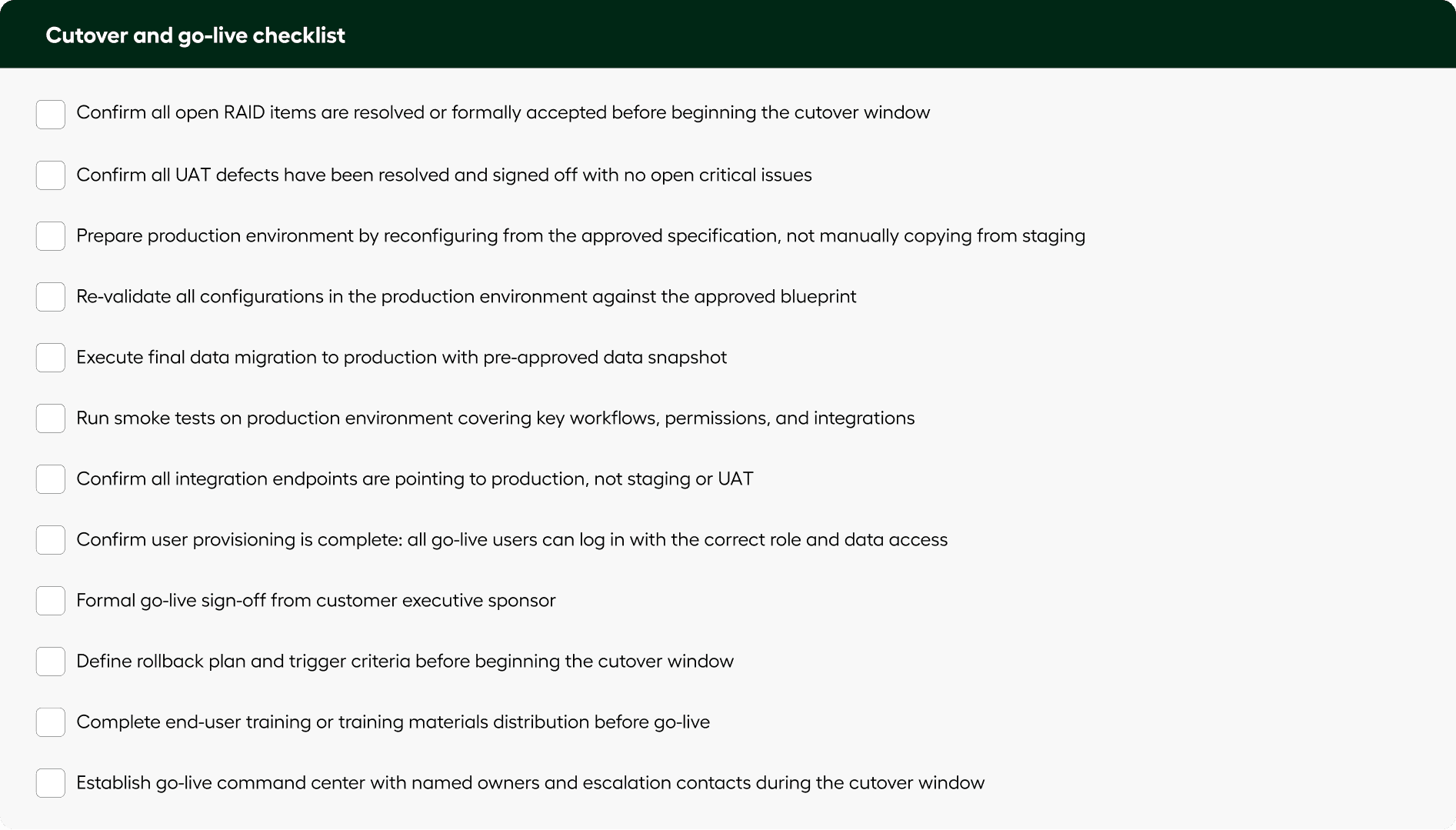
Critical risk: Never manually replicate staging to production. The production environment should be configured from the same specification document that drove staging, not rebuilt from memory. Configuration drift is a leading cause of post-go-live defects and the single most preventable failure in the SaaS go-live process.
How to Prevent Configuration Drift During SaaS Go-Live
Preventing configuration drift requires rebuilding production environments from the same approved specification used in staging.
Beacon configures production from the original specification instead of copying staging environments. This ensures consistency, eliminates drift, and validates the system before go-live.
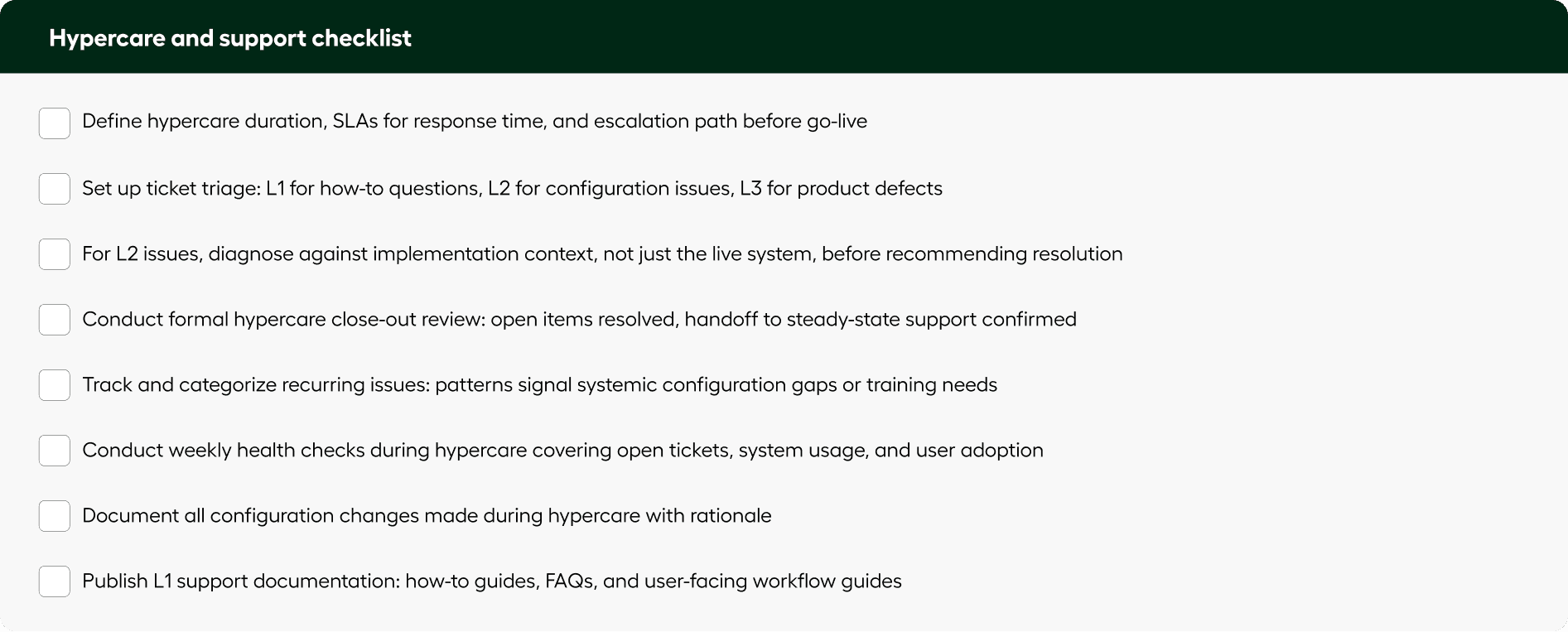
What is hypercare in SaaS implementation, and how long should it last after go-live?
Hypercare is the intensive support period immediately following go-live, typically lasting two to eight weeks for standard implementations, with highly complex enterprise deployments extending up to 90 days or longer. It exists because no matter how well tested an implementation is, the first weeks in production surface real usage patterns, configuration edge cases, and user questions that could not have been anticipated in UAT.
For most enterprise SaaS vendors, hypercare is also the period most likely to damage customer satisfaction, because it is the first time the customer is relying on the system for real work and support capacity is already stretched from the go-live push. A well-structured hypercare plan is one of the most underrated SaaS implementation best practices and prevents this from becoming the customer's lasting impression of the engagement.
L1 support covers usage questions like "how do I do X" or "where do I find Y," which should be answerable from documentation without a consultant. L2 support covers configuration issues, which require access to the original requirements, the configuration log, and the live system state. Both are predictable, and teams that plan for them have smoother hypercare periods than those that react to them.
How to Automate SaaS Hypercare and Post-Go-Live Support
Automating hypercare involves resolving user queries and configuration issues using product knowledge and implementation context.
Beacon handles L1 and L2 support by combining product knowledge with implementation data. It answers user questions and diagnoses issues without requiring manual intervention, reducing support load and improving response quality.
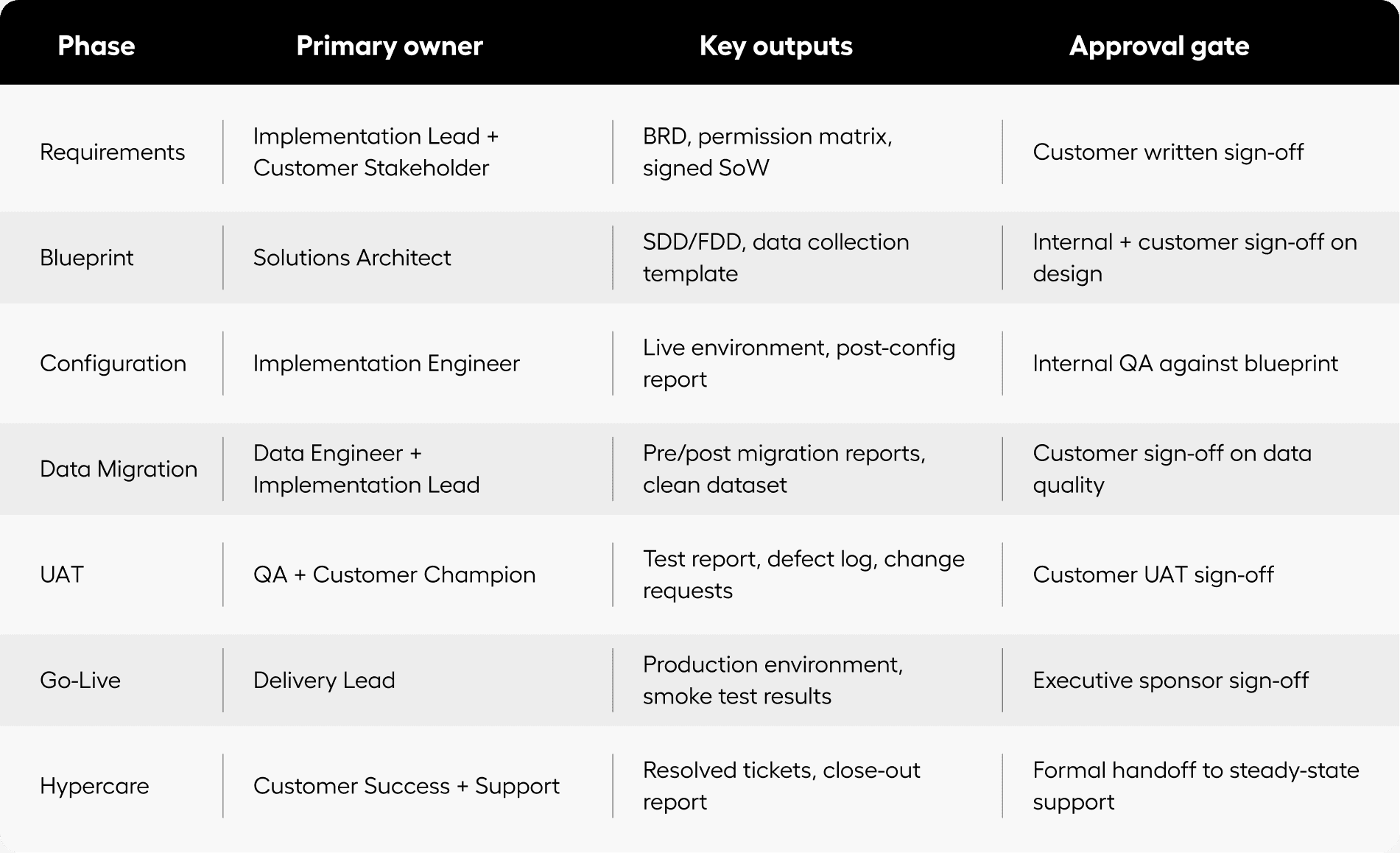
How does the SaaS implementation lifecycle map across owners, outputs, and approval gates?
Use this table to map ownership, expected outputs, and approval gates across the full SaaS implementation process.

Get the full enterprise SaaS implementation checklist
All 7 phases, 80+ checklist items, approval gates, and owner assignments in a single printable PDF your team can use on every engagement. Used by enterprise implementation teams to standardize delivery and reduce go-live delays.
Download PDF
Beacon is an AI implementation orchestration platform that automates the actual execution work across all 7 phases of the enterprise SaaS implementation checklist, from requirements capture through hypercare, without requiring backend access or API integration. Unlike project management tools or copilots, Beacon executes the implementation work itself. Every implementation it runs captures decision traces that make the next one faster.